
Smart Door Lock Using Touch Sensor Using Arduino
Touch to unlock: a servo opens the latch, then locks again after 3 seconds.
Built and tested by Shahan Fathima K · Industrial Robotics Institute
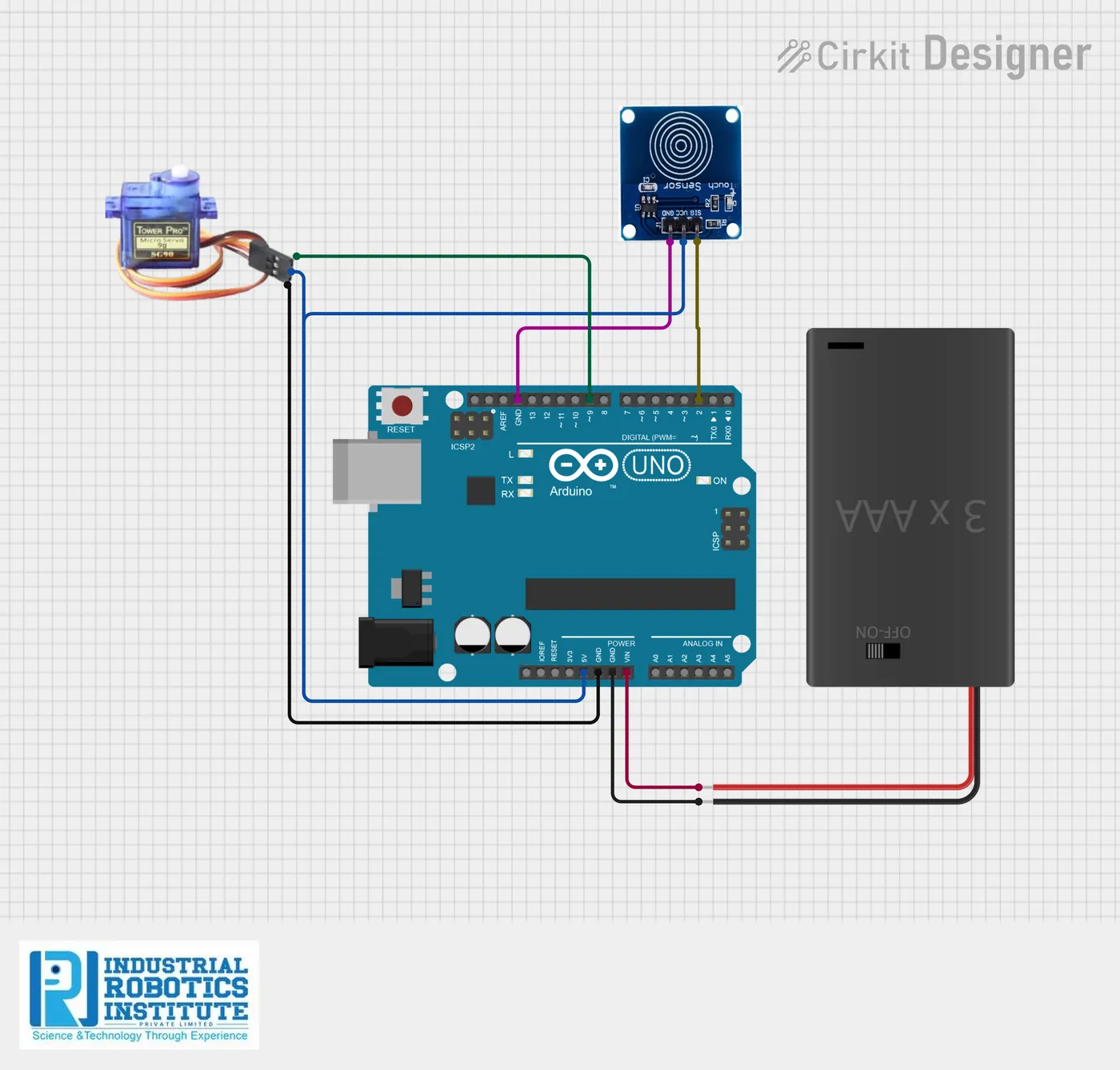
What is the Smart Door Lock Using Touch Sensor?
A simple touch-operated door lock. When you touch the TTP223 touch sensor, the Arduino turns a servo motor to open the lock, waits 3 seconds, and then turns it back to the locked position. It runs on two lithium-ion cells with an on/off switch.
How it works
- The touch sensor sends a HIGH signal when a finger touches it.
- The Arduino turns the servo to 90° to open the lock.
- After 3 seconds the servo returns to 0° and the door is locked again.
- The Arduino keeps checking for the next touch.
Parts list
| Component | Qty |
|---|---|
| Arduino Uno | 1 |
| Touch Sensor Module (TTP223) | 1 |
| Servo Motor (SG90) | 1 |
| Lithium-ion Batteries | 2 |
| Battery Case with Switch | 1 |
| Jumper Wires | As needed |
Software
- Arduino IDE
- Servo library
Wiring and connections
| From | Connect to |
|---|---|
| Touch sensor VCC | 5V |
| Touch sensor GND | GND |
| Touch sensor OUT | Pin 2 |
| Servo red | 5V |
| Servo brown | GND |
| Servo orange (signal) | Pin 9 |
| Battery + (via switch) | VIN |
| Battery − | GND |
How to build the Smart Door Lock Using Touch Sensor
- Connect the touch sensor to 5V, GND and pin 2.
- Connect the servo: red to 5V, brown to GND, orange to pin 9.
- Fit the batteries in the case and wire it to VIN and GND through the switch.
- Upload the code from the Arduino IDE.
- Attach the servo horn to a small latch or bolt on the door model.
- Touch the sensor: the lock should open, then close after 3 seconds.
Smart Door Lock Using Touch Sensor code
Complete, tested Arduino C++ code for this project. Copy it into Arduino IDE and upload it to the Arduino Uno.
#include <Servo.h>

Servo lockServo;
int touchPin = 2;

void setup()
{
  pinMode(touchPin, INPUT);
  lockServo.attach(9);
  lockServo.write(0);      // Locked position
}

void loop()
{
  int touchState = digitalRead(touchPin);

  if (touchState == HIGH)
  {
    lockServo.write(90);   // Open lock
    delay(3000);           // Wait 3 seconds
    lockServo.write(0);    // Close lock
  }
}
Real-world uses
- Cupboards and lockers
- Home door models
- Smart home demos
- Learning servo control
Frequently asked questions
What is a Smart Door Lock Using Touch Sensor?
A simple touch-operated door lock. When you touch the TTP223 touch sensor, the Arduino turns a servo motor to open the lock, waits 3 seconds, and then turns it back to the locked position.
What components are needed for the Smart Door Lock Using Touch Sensor?
You need: Arduino Uno (1), Touch Sensor Module (TTP223) (1), Servo Motor (SG90) (1), Lithium-ion Batteries (2), Battery Case with Switch (1), Jumper Wires. Software: Arduino IDE, Servo library.
Is the Smart Door Lock Using Touch Sensor project good for beginners?
Yes. It is rated beginner and takes about 1–2 hours to build, using the Arduino Uno. The guide on this page explains every connection and step.
Where can I get the code for the Smart Door Lock Using Touch Sensor?
The complete, tested Arduino C++ code is free on this page. Copy it into Arduino IDE and upload it to the board.
Can I buy a kit for the Smart Door Lock Using Touch Sensor?
Yes. IRI sells a kit with the parts for this project (PRJ-023). Message IRI on WhatsApp at +91 86060 82634 for the kit price and delivery details.