
Smart Delivery Robot Using Arduino
A delivery robot with three password-protected compartments opened by servo motors.
Built and tested by Shahan Fathima K · Industrial Robotics Institute
What is the Smart Delivery Robot?
This delivery robot provides secure compartments so items can be delivered safely using password protection. An Arduino Uno reads a 5-digit password from a 4×4 keypad and drives three servo motors, one for each box. Each box has its own unique password; pressing * opens the selected box and # closes it.
How it works
- The user enters a 5-digit password on the 4×4 keypad.
- The Arduino compares the entered password with the three stored passwords.
- A matching password selects the corresponding box (1, 2 or 3).
- Pressing * rotates that box’s servo to 90° to open it; pressing # returns it to 0° to close it.
- A wrong password selects no box, so no action occurs.
Parts list
| Component | Qty |
|---|---|
| Arduino Uno | 1 |
| 4×4 Keypad | 1 |
| Servo Motor (SG90) | 3 |
| Jumper Wires | As needed |
| Lithium-ion Battery | 2 |
| Battery Case with Switch | 1 |
Software
- Arduino IDE
- Keypad library
- Servo library
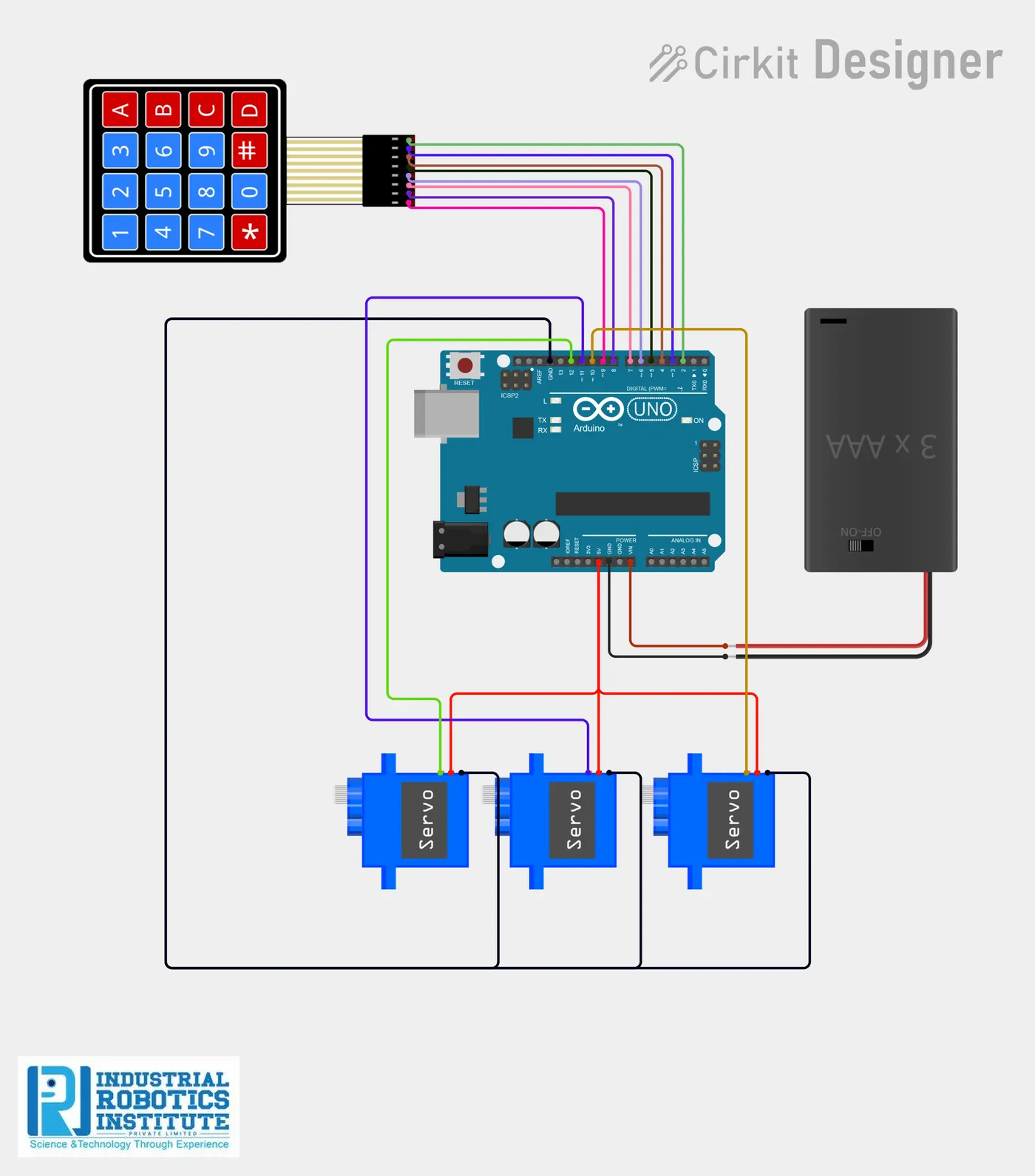
Wiring and connections
| From | Connect to |
|---|---|
| Keypad Rows | Pins 9, 8, 7, 6 |
| Keypad Columns | Pins 5, 4, 3, 2 |
| Servo 1 Signal (Box 1) | Pin 10 |
| Servo 2 Signal (Box 2) | Pin 11 |
| Servo 3 Signal (Box 3) | Pin 12 |
| All Servo VCC | 5V |
| All Servo GND | GND |
| Battery + | Arduino VIN |
| Battery – | GND |
How to build the Smart Delivery Robot
- Connect the keypad row pins to Arduino pins 9, 8, 7, 6 and column pins to 5, 4, 3, 2.
- Attach the three SG90 servos to the box lids and connect their signal wires to pins 10, 11 and 12.
- Connect all servo VCC wires to 5V and GND wires to GND.
- Wire the battery case positive to VIN and negative to GND, using the switch for ON/OFF.
- Install the Keypad library in the Arduino IDE and upload the code.
- Set your own 5-digit passwords for pass1, pass2 and pass3 in the code if needed.
- Test: enter a box password, press * to open and # to close.
Smart Delivery Robot code
Complete, tested Arduino C++ code for this project. Copy it into Arduino IDE and upload it to the Arduino Uno.
#include <Keypad.h>
#include <Servo.h>

Servo box1;
Servo box2;
Servo box3;

const byte ROWS = 4;
const byte COLS = 4;

char keys[ROWS][COLS] = {
  {'1','2','3','A'},
  {'4','5','6','B'},
  {'7','8','9','C'},
  {'*','0','#','D'}
};

byte rowPins[ROWS] = {9,8,7,6};
byte colPins[COLS] = {5,4,3,2};

Keypad keypad = Keypad(makeKeymap(keys), rowPins, colPins, ROWS, COLS);

String input = "";

// 5-digit passwords
String pass1 = "12345";
String pass2 = "23456";
String pass3 = "34567";

int activeBox = 0;

void setup()
{
  box1.attach(10);
  box2.attach(11);
  box3.attach(12);

  box1.write(0);
  box2.write(0);
  box3.write(0);
}

void loop()
{
  char key = keypad.getKey();

  if (key)
  {
    if (key >= '0' && key <= '9')
    {
      input += key;
    }

    if (input.length() == 5)
    {
      if (input == pass1) activeBox = 1;
      else if (input == pass2) activeBox = 2;
      else if (input == pass3) activeBox = 3;
      else activeBox = 0;

      input = "";
    }

    // Open box
    if (key == '*' && activeBox != 0)
    {
      if (activeBox == 1) box1.write(90);
      if (activeBox == 2) box2.write(90);
      if (activeBox == 3) box3.write(90);
    }

    // Close box
    if (key == '#' && activeBox != 0)
    {
      if (activeBox == 1) box1.write(0);
      if (activeBox == 2) box2.write(0);
      if (activeBox == 3) box3.write(0);

      activeBox = 0;
    }
  }
}
Real-world uses
- Secure parcel delivery
- Office or campus document delivery
- Controlled-access item storage
Frequently asked questions
What is a Smart Delivery Robot?
This delivery robot provides secure compartments so items can be delivered safely using password protection. An Arduino Uno reads a 5-digit password from a 4×4 keypad and drives three servo motors, one for each box.
What components are needed for the Smart Delivery Robot?
You need: Arduino Uno (1), 4×4 Keypad (1), Servo Motor (SG90) (3), Jumper Wires, Lithium-ion Battery (2), Battery Case with Switch (1). Software: Arduino IDE, Keypad library, Servo library.
Is the Smart Delivery Robot project good for beginners?
Yes. It is rated beginner and takes about 3–4 hours to build, using the Arduino Uno. The guide on this page explains every connection and step.
Where can I get the code for the Smart Delivery Robot?
The complete, tested Arduino C++ code is free on this page. Copy it into Arduino IDE and upload it to the board.
Can I buy a kit for the Smart Delivery Robot?
Yes. IRI sells a kit with the parts for this project (PRJ-033). Message IRI on WhatsApp at +91 86060 82634 for the kit price and delivery details.