
Warehouse Item Transport Robot Using Arduino
A line-following robot that carries items along a marked warehouse route.
Built and tested by Shahan Fathima K · Industrial Robotics Institute
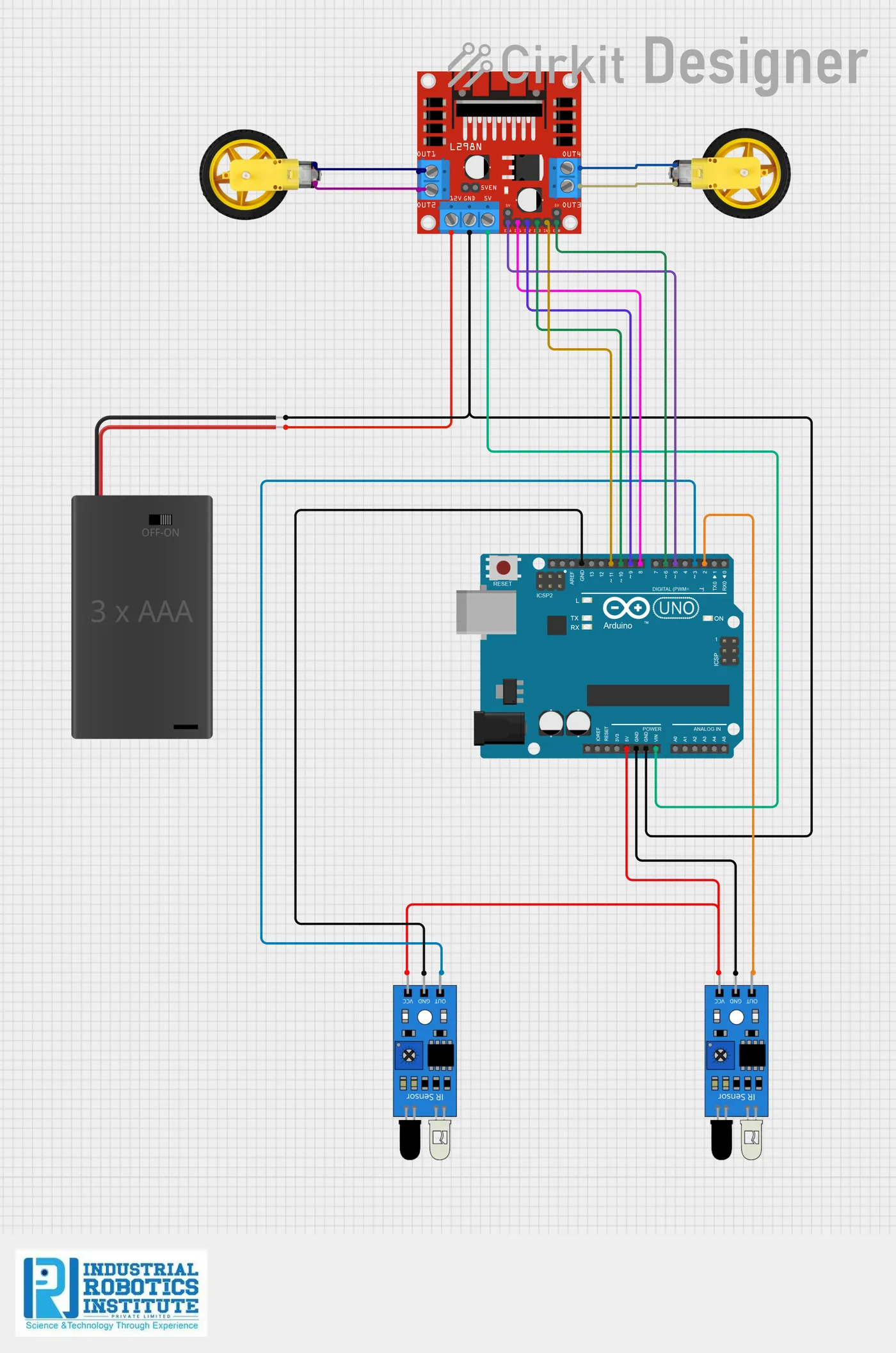
What is the Warehouse Item Transport Robot?
An automated transport robot for warehouses. Two IR sensors follow a black line on the floor, and the Arduino steers the motors through an L298N driver to stay on the path. It carries items along the route on its own, saving manual effort.
How it works
- Two IR sensors under the robot look at the floor for the black line.
- Both on the line: drive forward.
- Left sensor off the line: turn left. Right sensor off: turn right.
- Both off the line: stop.
- The Arduino checks the sensors ten times a second.
Parts list
| Component | Qty |
|---|---|
| Arduino Uno | 1 |
| L298N Motor Driver Module | 1 |
| DC Motors with Wheels | 2 |
| Robot Chassis | 1 |
| IR Sensor Modules | 2 |
| Battery Pack (7.4V / 12V) | 1 |
| Jumper Wires | As needed |
Software
- Arduino IDE
Wiring and connections
| From | Connect to |
|---|---|
| Left IR OUT | Pin 2 |
| Right IR OUT | Pin 3 |
| IR VCC / GND | 5V / GND |
| L298N IN1 | Pin 8 |
| L298N IN2 | Pin 9 |
| L298N IN3 | Pin 10 |
| L298N IN4 | Pin 11 |
| L298N ENA / ENB | 5V (jumpers on) |
| L298N VCC | Battery + |
| L298N GND | GND |
How to build the Warehouse Item Transport Robot
- Build the chassis with two motors and wheels, and a flat top to carry items.
- Mount two IR sensors at the front, either side of the line, facing down.
- Connect the sensors to pins 2 and 3 and the L298N to pins 8–11.
- Power the L298N from the battery pack and join the grounds.
- Mark a route on the floor with black electrical tape.
- Upload the code and place the robot on the line.
Warehouse Item Transport Robot code
Complete, tested Arduino C++ code for this project. Copy it into Arduino IDE and upload it to the Arduino Uno.
#define leftSensor  2
#define rightSensor 3

#define in1 8
#define in2 9
#define in3 10
#define in4 11

void forward()   { digitalWrite(in1, HIGH); digitalWrite(in2, LOW);  digitalWrite(in3, HIGH); digitalWrite(in4, LOW);  }
void leftTurn()  { digitalWrite(in1, LOW);  digitalWrite(in2, HIGH); digitalWrite(in3, HIGH); digitalWrite(in4, LOW);  }
void rightTurn() { digitalWrite(in1, HIGH); digitalWrite(in2, LOW);  digitalWrite(in3, LOW);  digitalWrite(in4, HIGH); }
void stopRobot() { digitalWrite(in1, LOW);  digitalWrite(in2, LOW);  digitalWrite(in3, LOW);  digitalWrite(in4, LOW);  }

void setup()
{
  pinMode(leftSensor, INPUT);
  pinMode(rightSensor, INPUT);
  pinMode(in1, OUTPUT);
  pinMode(in2, OUTPUT);
  pinMode(in3, OUTPUT);
  pinMode(in4, OUTPUT);
}

void loop()
{
  int left = digitalRead(leftSensor);    // LOW = on line
  int right = digitalRead(rightSensor);

  if (left == LOW && right == LOW)        forward();
  else if (left == HIGH && right == LOW)  leftTurn();
  else if (left == LOW && right == HIGH)  rightTurn();
  else                                    stopRobot();

  delay(100);
}
Real-world uses
- Warehouses and factories
- Hospital supply delivery
- Line-follower competitions
- Learning autonomous navigation
Frequently asked questions
What is a Warehouse Item Transport Robot?
An automated transport robot for warehouses. Two IR sensors follow a black line on the floor, and the Arduino steers the motors through an L298N driver to stay on the path.
What components are needed for the Warehouse Item Transport Robot?
You need: Arduino Uno (1), L298N Motor Driver Module (1), DC Motors with Wheels (2), Robot Chassis (1), IR Sensor Modules (2), Battery Pack (7.4V / 12V) (1), Jumper Wires. Software: Arduino IDE.
Is the Warehouse Item Transport Robot project good for beginners?
Yes. It is rated beginner and takes about 3–4 hours to build, using the Arduino Uno. The guide on this page explains every connection and step.
Where can I get the code for the Warehouse Item Transport Robot?
The complete, tested Arduino C++ code is free on this page. Copy it into Arduino IDE and upload it to the board.
Can I buy a kit for the Warehouse Item Transport Robot?
Yes. IRI sells a kit with the parts for this project (PRJ-069). Message IRI on WhatsApp at +91 86060 82634 for the kit price and delivery details.