
IoT Smart Weather Alert System Using ESP32
Watches temperature, humidity, rain and light, and warns of sudden weather changes.
Built and tested by Drisya K S · Industrial Robotics Institute
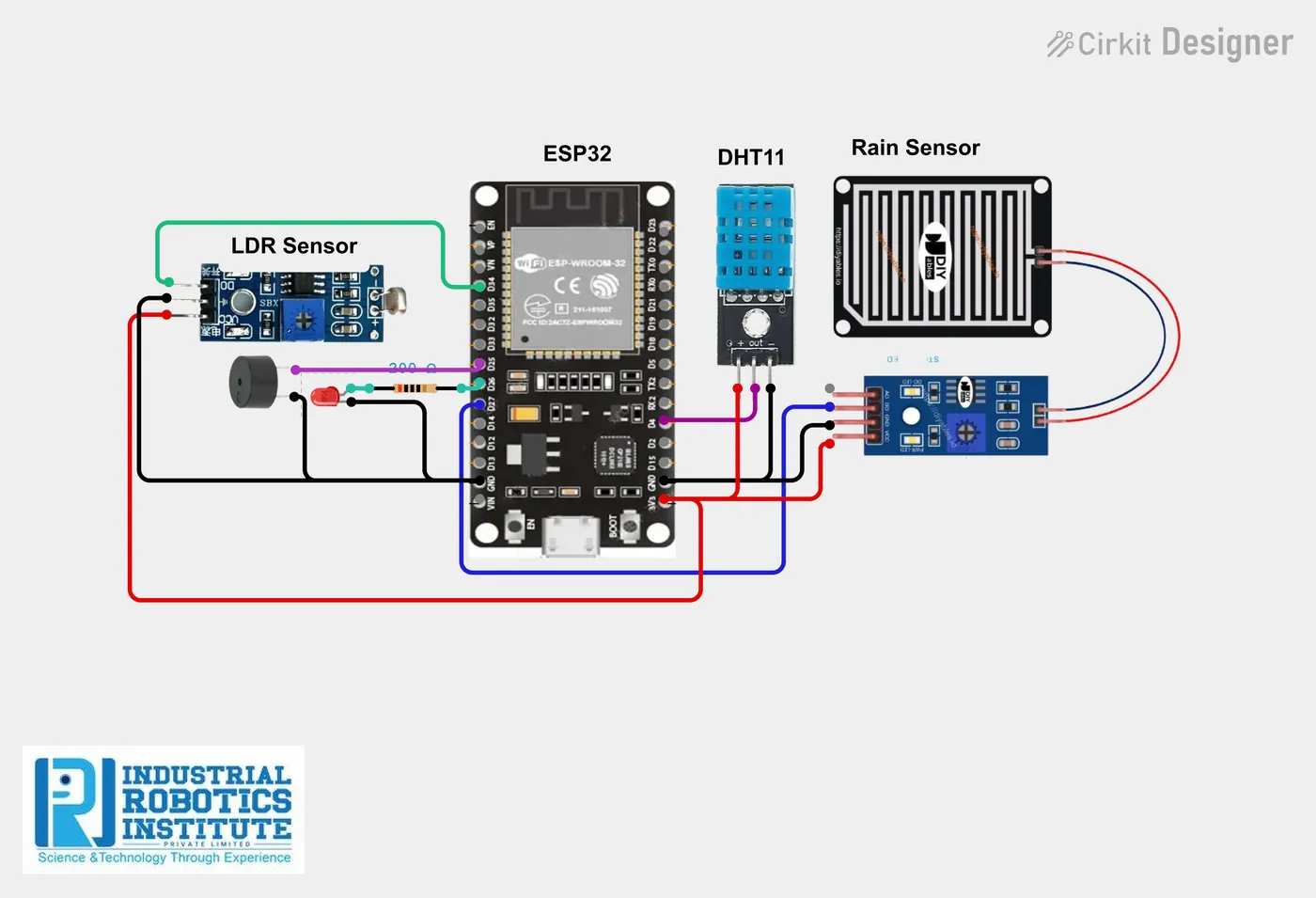
What is the IoT Smart Weather Alert System?
A mini weather station that alerts you to sudden changes. A DHT11 measures temperature and humidity, a rain sensor detects droplets, and an LDR tracks light. The ESP32 sends all readings to the Blynk app, and on rain, high heat or sudden darkness it shows an alert and sounds a buzzer.
How it works
- The DHT11, rain sensor and LDR are read every second.
- Temperature, humidity and light go to Blynk V1, V2 and V3.
- Rain detected: buzzer and LED on, status "Rain Detected".
- Above 35 °C: buzzer on, "High Temperature Alert". Light below 1000: "Possible Weather Change".
- Otherwise the status is "Weather Normal".
Parts list
| Component | Qty |
|---|---|
| ESP32 Dev Board | 1 |
| DHT11 Temperature & Humidity Sensor | 1 |
| Rain Sensor Module | 1 |
| LDR | 1 |
| Resistor 10kΩ | 1 |
| Buzzer | 1 |
| LED (optional) | 1 |
| Resistor 220Ω | 1 |
| Jumper Wires / Breadboard | As needed |
| Power Supply | 1 |
Software
- Arduino IDE
- Blynk IoT app
- DHT sensor library
Wiring and connections
| From | Connect to |
|---|---|
| DHT11 VCC | 3.3V |
| DHT11 GND | GND |
| DHT11 DATA | GPIO 4 |
| Rain sensor VCC | 3.3V |
| Rain sensor GND | GND |
| Rain sensor DO | GPIO 27 |
| LDR | 3.3V to GPIO 34 |
| 10kΩ resistor | GPIO 34 to GND |
| Buzzer + | GPIO 25 |
| LED + (via 220Ω) | GPIO 26 |
How to build the IoT Smart Weather Alert System
- Wire the DHT11 to GPIO 4, the rain sensor DO to GPIO 27 and the LDR divider to GPIO 34.
- Connect the buzzer to GPIO 25 and the LED to GPIO 26.
- In Blynk, create a "Weather System" template (ESP32, Wi-Fi) with V1 temperature, V2 humidity, V3 light and V4 status (string).
- Add gauges for V1/V2, a value display for V3 and a label for V4.
- Add your Blynk details and Wi-Fi to the code and upload it.
- Place the rain sensor board outdoors, angled so water runs off.
IoT Smart Weather Alert System code
Complete, tested Arduino C++ code for this project. Copy it into Arduino IDE and upload it to the ESP32.
#define BLYNK_TEMPLATE_ID "YourTemplateID"
#define BLYNK_TEMPLATE_NAME "Weather System"
#define BLYNK_AUTH_TOKEN "YourAuthToken"

#include <WiFi.h>
#include <BlynkSimpleEsp32.h>
#include <DHT.h>

char ssid[] = "YourWiFiName";
char pass[] = "YourWiFiPassword";

#define DHTPIN 4
#define DHTTYPE DHT11
DHT dht(DHTPIN, DHTTYPE);

int rainPin = 27;
int ldrPin = 34;
int buzzer = 25;
int led = 26;

void setup() {
  Serial.begin(115200);
  pinMode(rainPin, INPUT);
  pinMode(buzzer, OUTPUT);
  pinMode(led, OUTPUT);
  dht.begin();
  Blynk.begin(BLYNK_AUTH_TOKEN, ssid, pass);
}

void loop() {
  float temp = dht.readTemperature();
  float humidity = dht.readHumidity();
  int rain = digitalRead(rainPin);     // LOW = rain
  int light = analogRead(ldrPin);

  Blynk.virtualWrite(V1, temp);
  Blynk.virtualWrite(V2, humidity);
  Blynk.virtualWrite(V3, light);

  if (rain == LOW) {
    digitalWrite(buzzer, HIGH);
    digitalWrite(led, HIGH);
    Blynk.virtualWrite(V4, "Rain Detected");
  }
  else if (temp > 35) {
    digitalWrite(buzzer, HIGH);
    digitalWrite(led, LOW);
    Blynk.virtualWrite(V4, "High Temperature Alert");
  }
  else if (light < 1000) {
    digitalWrite(buzzer, LOW);
    digitalWrite(led, LOW);
    Blynk.virtualWrite(V4, "Low Light / Possible Weather Change");
  }
  else {
    digitalWrite(buzzer, LOW);
    digitalWrite(led, LOW);
    Blynk.virtualWrite(V4, "Weather Normal");
  }

  Blynk.run();
  delay(1000);
}
Real-world uses
- Farmers and gardeners
- Outdoor workers and events
- Schools’ weather stations
- Smart city sensing
Frequently asked questions
What is a IoT Smart Weather Alert System?
A mini weather station that alerts you to sudden changes. A DHT11 measures temperature and humidity, a rain sensor detects droplets, and an LDR tracks light.
What components are needed for the IoT Smart Weather Alert System?
You need: ESP32 Dev Board (1), DHT11 Temperature & Humidity Sensor (1), Rain Sensor Module (1), LDR (1), Resistor 10kΩ (1), Buzzer (1), LED (optional) (1), Resistor 220Ω (1), Jumper Wires / Breadboard, Power Supply (1). Software: Arduino IDE, Blynk IoT app, DHT sensor library.
Is the IoT Smart Weather Alert System project good for beginners?
It is rated intermediate and takes about 2–3 hours to build, using the ESP32. The guide on this page explains every connection and step.
Where can I get the code for the IoT Smart Weather Alert System?
The complete, tested Arduino C++ code is free on this page. Copy it into Arduino IDE and upload it to the board.
Can I buy a kit for the IoT Smart Weather Alert System?
Yes. IRI sells a kit with the parts for this project (PRJ-153). Message IRI on WhatsApp at +91 86060 82634 for the kit price and delivery details.