
IoT Smart Anti-Sleep Alarm for Drivers Using ESP32
Detects closed eyes or a drooping head and buzzes and vibrates to wake the driver.
Built and tested by Drisya K S · Industrial Robotics Institute
What is the IoT Smart Anti-Sleep Alarm for Drivers?
A drowsiness alarm for drivers. An eye-blink IR sensor on glasses detects when the eyes stay closed, and an MPU6050 detects the head nodding forward. When either happens, the ESP32 sounds a buzzer, starts a vibration motor and lights an LED, and sends a "Driver Drowsy Alert!" to the Blynk app.
How it works
- The eye-blink IR sensor on the glasses reports when the eye is closed (LOW).
- The MPU6050 measures head tilt; a forward nod shows as a large change on one axis.
- If the eye is closed or the head drops, the buzzer, vibration motor and LED turn on.
- The status "Driver Drowsy Alert!" or "Driver Alert" is sent to Blynk V1.
- The push button can silence the alarm.
Parts list
| Component | Qty |
|---|---|
| ESP32 Dev Board | 1 |
| Eye Blink Sensor / IR Sensor Module | 1 |
| MPU6050 Accelerometer | 1 |
| Vibration Motor | 1 |
| Buzzer | 1 |
| LED | 1 |
| Resistor 220Ω | 1 |
| Push Button | 1 |
| Battery Pack | 1 |
Software
- Arduino IDE
- Blynk IoT app
- MPU6050 library
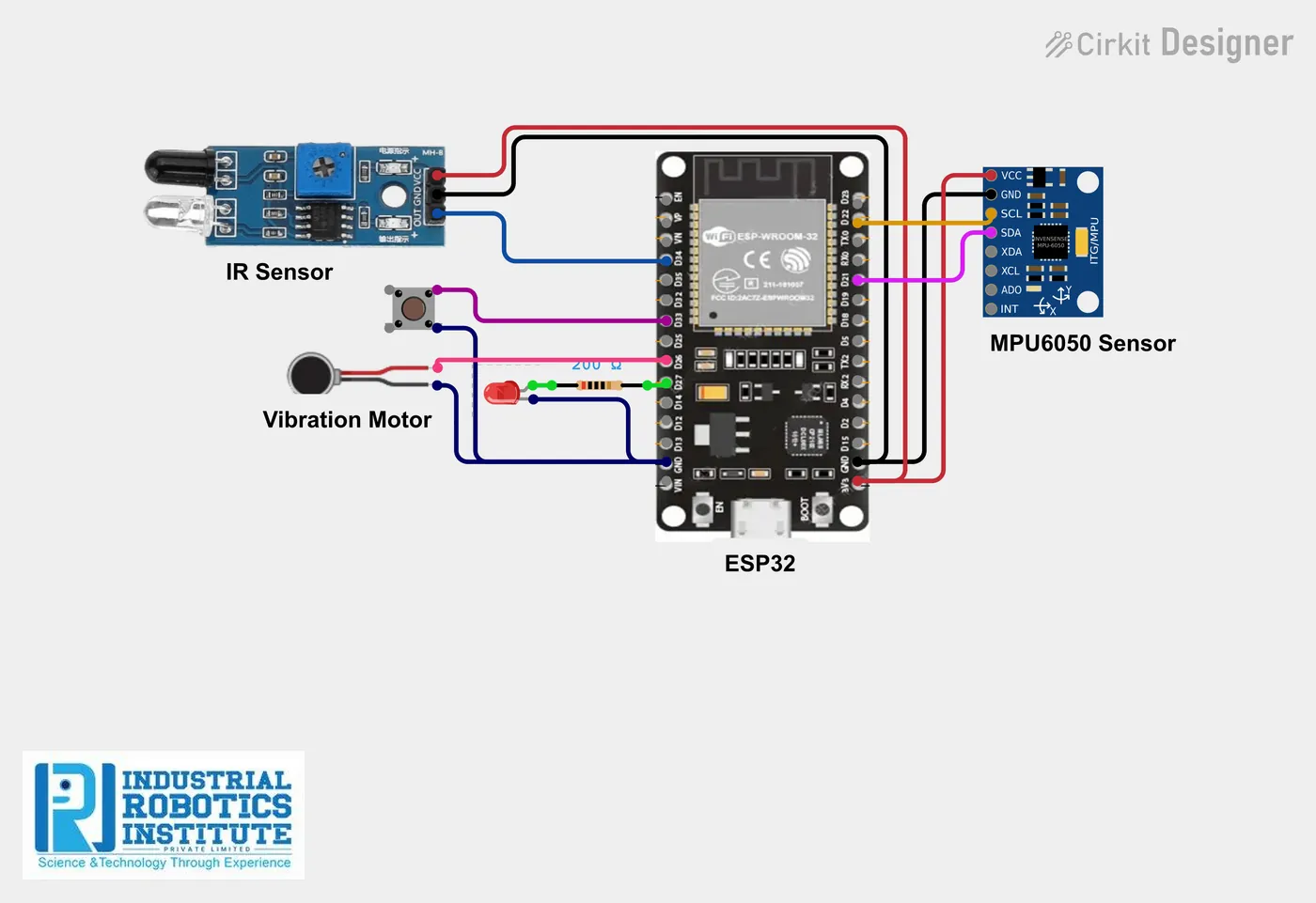
Wiring and connections
| From | Connect to |
|---|---|
| Eye sensor VCC | 3.3V |
| Eye sensor GND | GND |
| Eye sensor OUT | GPIO 34 |
| MPU6050 SDA | GPIO 21 |
| MPU6050 SCL | GPIO 22 |
| MPU6050 VCC / GND | 3.3V / GND |
| Vibration motor + | GPIO 25 (via transistor) |
| Buzzer + | GPIO 26 |
| LED + (via 220Ω) | GPIO 27 |
| Reset button | GPIO 33 and GND |
How to build the IoT Smart Anti-Sleep Alarm for Drivers
- Fix the eye-blink sensor to a glasses frame and the MPU6050 to the side of the glasses or a cap.
- Wire the sensors and outputs as in the table; drive the vibration motor through a transistor.
- In Blynk, create datastream V1 (string) with a label and notification.
- Install the MPU6050 library, add your Blynk details and Wi-Fi, and upload.
- Test by closing your eyes and tilting your head forward; adjust the tilt limit.
IoT Smart Anti-Sleep Alarm for Drivers code
Complete, tested Arduino C++ code for this project. Copy it into Arduino IDE and upload it to the ESP32.
#define BLYNK_TEMPLATE_ID "YourTemplateID"
#define BLYNK_TEMPLATE_NAME "Driver Alert"
#define BLYNK_AUTH_TOKEN "YourAuthToken"

#include <WiFi.h>
#include <BlynkSimpleEsp32.h>
#include <Wire.h>
#include <MPU6050.h>

char ssid[] = "YourWiFiName";
char pass[] = "YourWiFiPassword";

MPU6050 mpu;

int eyeSensor = 34;
int vibration = 25;
int buzzer = 26;
int led = 27;
int button = 33;

int tiltLimit = 8000;   // ~30 degrees forward nod; adjust after testing

void setup() {
  Serial.begin(115200);
  Wire.begin();
  mpu.initialize();

  pinMode(eyeSensor, INPUT);
  pinMode(buzzer, OUTPUT);
  pinMode(vibration, OUTPUT);
  pinMode(led, OUTPUT);
  pinMode(button, INPUT_PULLUP);

  Blynk.begin(BLYNK_AUTH_TOKEN, ssid, pass);
}

void loop() {
  int eyeState = digitalRead(eyeSensor);   // LOW = eye closed

  int16_t ax, ay, az;
  mpu.getAcceleration(&ax, &ay, &az);
  bool headDropped = abs(ax) > tiltLimit;  // forward/back tilt axis

  if (eyeState == LOW || headDropped) {
    digitalWrite(buzzer, HIGH);
    digitalWrite(vibration, HIGH);
    digitalWrite(led, HIGH);
    Blynk.virtualWrite(V1, "Driver Drowsy Alert!");
  } else {
    digitalWrite(buzzer, LOW);
    digitalWrite(vibration, LOW);
    digitalWrite(led, LOW);
    Blynk.virtualWrite(V1, "Driver Alert");
  }

  // Manual silence
  if (digitalRead(button) == LOW) {
    digitalWrite(buzzer, LOW);
    digitalWrite(vibration, LOW);
  }

  Blynk.run();
  delay(500);
}
Real-world uses
- Long-distance drivers
- Truck and bus fleets
- Night-shift workers
- Road safety projects
Frequently asked questions
What is a IoT Smart Anti-Sleep Alarm for Drivers?
A drowsiness alarm for drivers. An eye-blink IR sensor on glasses detects when the eyes stay closed, and an MPU6050 detects the head nodding forward.
What components are needed for the IoT Smart Anti-Sleep Alarm for Drivers?
You need: ESP32 Dev Board (1), Eye Blink Sensor / IR Sensor Module (1), MPU6050 Accelerometer (1), Vibration Motor (1), Buzzer (1), LED (1), Resistor 220Ω (1), Push Button (1), Battery Pack (1). Software: Arduino IDE, Blynk IoT app, MPU6050 library.
Is the IoT Smart Anti-Sleep Alarm for Drivers project good for beginners?
It is rated intermediate and takes about 3–4 hours to build, using the ESP32. The guide on this page explains every connection and step.
Where can I get the code for the IoT Smart Anti-Sleep Alarm for Drivers?
The complete, tested Arduino C++ code is free on this page. Copy it into Arduino IDE and upload it to the board.
Can I buy a kit for the IoT Smart Anti-Sleep Alarm for Drivers?
Yes. IRI sells a kit with the parts for this project (PRJ-155). Message IRI on WhatsApp at +91 86060 82634 for the kit price and delivery details.