
IoT Smart School Bell System Using ESP32
Rings the school bell automatically at the right times using a real-time clock.
Built and tested by Drisya K S · Industrial Robotics Institute
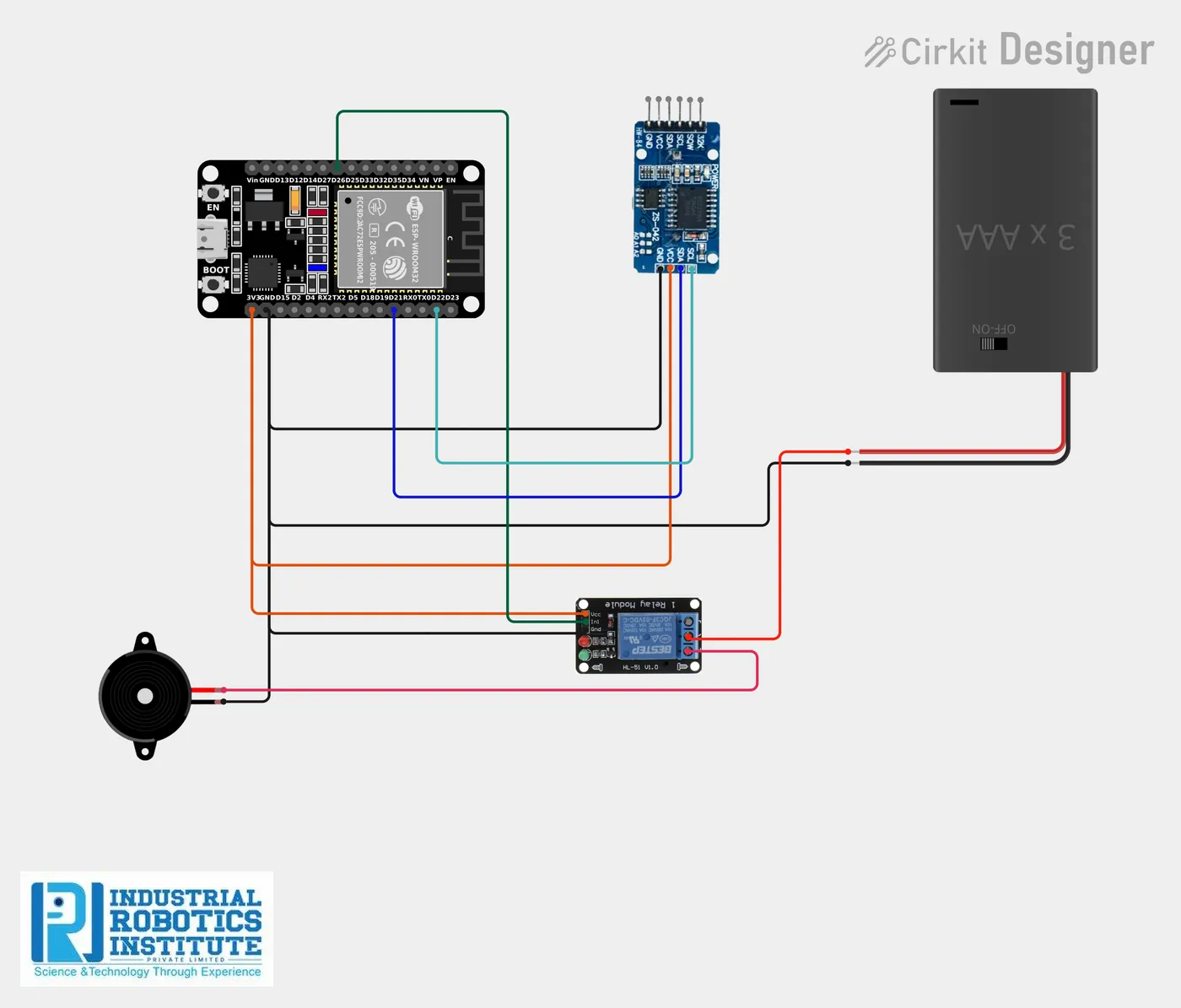
What is the IoT Smart School Bell System?
An automatic school bell. A DS3231 real-time clock keeps accurate time, and the ESP32 compares it with the stored timetable. When a period starts or ends, it switches a relay to ring the bell for 5 seconds, with no one needing to remember to ring it.
How it works
- The DS3231 RTC keeps accurate time, even through power cuts.
- The ESP32 reads the current hour and minute every second.
- When the time matches an entry in the timetable, the relay rings the bell for 5 seconds.
- Each bell rings only once per scheduled minute.
Parts list
| Component | Qty |
|---|---|
| ESP32 Dev Board | 1 |
| Relay Module | 1 |
| Electric Bell or Buzzer | 1 |
| RTC Module (DS3231) | 1 |
| Jumper Wires / Breadboard | As needed |
| 5V Power Supply | 1 |
Software
- Arduino IDE
- RTClib library
- Blynk (optional, for manual ringing)
Wiring and connections
| From | Connect to |
|---|---|
| RTC VCC | 3.3V |
| RTC GND | GND |
| RTC SDA | GPIO 21 |
| RTC SCL | GPIO 22 |
| Relay VCC | 5V |
| Relay GND | GND |
| Relay IN | GPIO 26 |
| Bell | Through relay COM / NO with its own supply |
How to build the IoT Smart School Bell System
- Connect the RTC to GPIO 21 (SDA) and 22 (SCL).
- Connect the relay to GPIO 26 and wire the bell through its COM and NO terminals.
- Install RTClib. Set the RTC time once (see the comment in the code).
- Edit the timetable in the code with your school’s bell times.
- Upload and check the Serial Monitor shows the correct time.
IoT Smart School Bell System code
Complete, tested Arduino C++ code for this project. Copy it into Arduino IDE and upload it to the ESP32.
#include <Wire.h>
#include <RTClib.h>

RTC_DS3231 rtc;

#define relayPin 26

// Timetable: {hour, minute}
int bellTimes[][2] = {
  {9, 0}, {9, 45}, {10, 30}, {10, 45}, {11, 30},
  {12, 15}, {13, 0}, {13, 45}, {14, 30}, {15, 15}
};
int numBells = sizeof(bellTimes) / sizeof(bellTimes[0]);
int lastRungMinute = -1;

void ringBell() {
  digitalWrite(relayPin, HIGH);
  delay(5000);              // ring for 5 seconds
  digitalWrite(relayPin, LOW);
}

void setup() {
  pinMode(relayPin, OUTPUT);
  Serial.begin(115200);

  if (!rtc.begin()) {
    Serial.println("RTC not found!");
  }
  // Set time once, then comment out and upload again:
  // rtc.adjust(DateTime(F(__DATE__), F(__TIME__)));
}

void loop() {
  DateTime now = rtc.now();
  int hour = now.hour();
  int minute = now.minute();

  Serial.print(hour);
  Serial.print(":");
  Serial.println(minute);

  for (int i = 0; i < numBells; i++) {
    if (hour == bellTimes[i][0] && minute == bellTimes[i][1] &&
        (hour * 60 + minute) != lastRungMinute) {
      ringBell();
      lastRungMinute = hour * 60 + minute;
    }
  }

  delay(1000);
}
Real-world uses
- Schools and colleges
- Factories (shift sirens)
- Coaching centres
- Learning RTC scheduling
Frequently asked questions
What is a IoT Smart School Bell System?
An automatic school bell. A DS3231 real-time clock keeps accurate time, and the ESP32 compares it with the stored timetable.
What components are needed for the IoT Smart School Bell System?
You need: ESP32 Dev Board (1), Relay Module (1), Electric Bell or Buzzer (1), RTC Module (DS3231) (1), Jumper Wires / Breadboard, 5V Power Supply (1). Software: Arduino IDE, RTClib library, Blynk (optional, for manual ringing).
Is the IoT Smart School Bell System project good for beginners?
Yes. It is rated beginner and takes about 1–2 hours to build, using the ESP32. The guide on this page explains every connection and step.
Where can I get the code for the IoT Smart School Bell System?
The complete, tested Arduino C++ code is free on this page. Copy it into Arduino IDE and upload it to the board.
Can I buy a kit for the IoT Smart School Bell System?
Yes. IRI sells a kit with the parts for this project (PRJ-162). Message IRI on WhatsApp at +91 86060 82634 for the kit price and delivery details.