
IoT Smart Library Seat Availability Using ESP32
Shows whether each library seat is free or taken.
Built and tested by Drisya K S · Industrial Robotics Institute
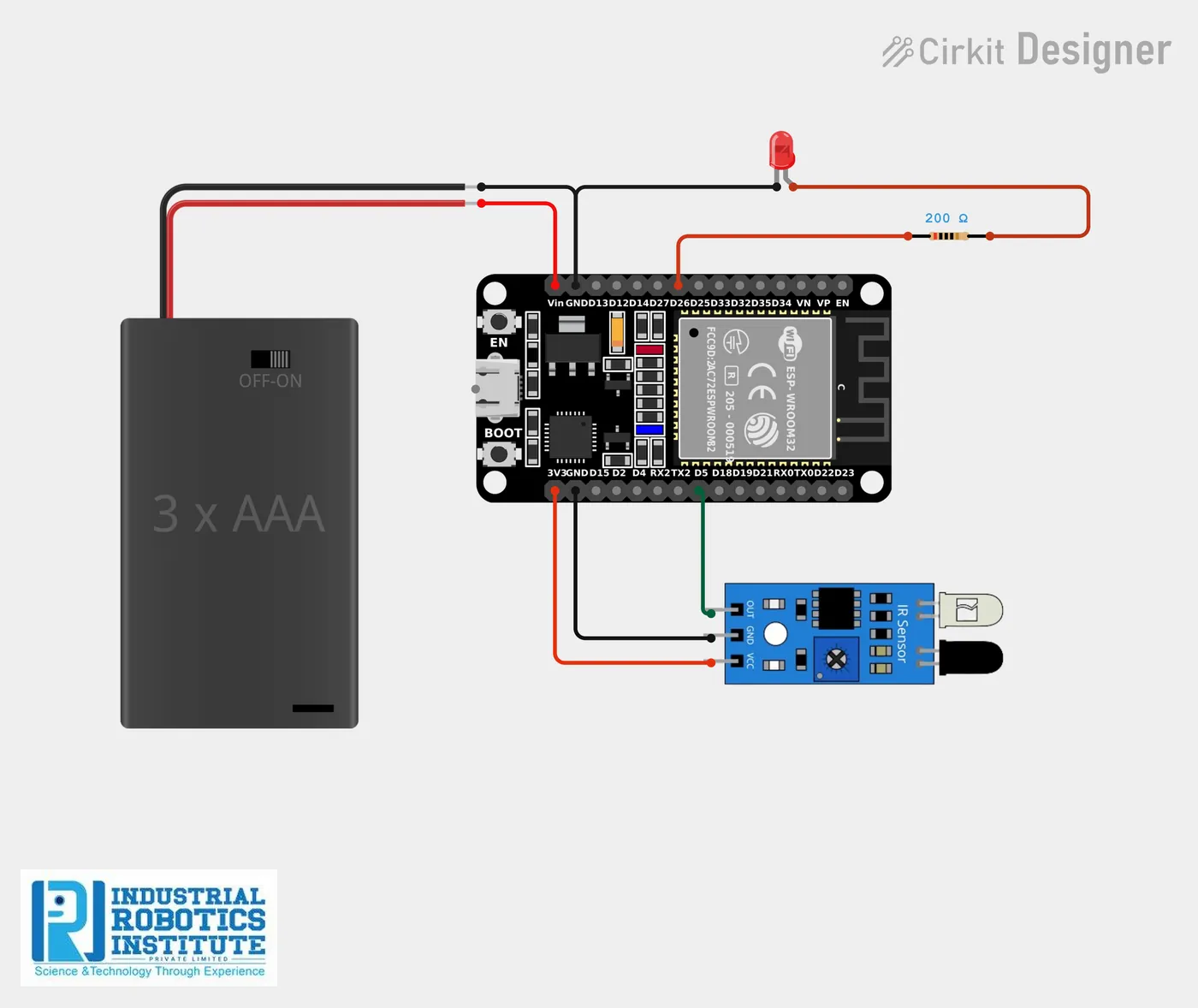
What is the IoT Smart Library Seat Availability?
A seat-finder for busy libraries. An IR sensor on each seat detects whether someone is sitting there; the ESP32 lights an LED and reports "Seat Occupied" or "Seat Available", ready to be shown on a display or in the Blynk app so students can find a free seat quickly.
How it works
- An IR sensor under or behind the seat detects a person (output LOW).
- The ESP32 reads it twice a second.
- Occupied: the LED turns on and "Seat Occupied" is reported.
- Empty: the LED turns off and "Seat Available" is reported. Add more sensors for more seats.
Parts list
| Component | Qty |
|---|---|
| ESP32 Dev Board | 1 |
| IR Sensor Module (one per seat) | 1 |
| LED Indicator | 1 |
| Resistor 220Ω | 1 |
| Jumper Wires / Breadboard | As needed |
| 5V Power Supply | 1 |
Software
- Arduino IDE
- Blynk (optional)
Wiring and connections
| From | Connect to |
|---|---|
| IR sensor VCC | 3.3V |
| IR sensor GND | GND |
| IR sensor OUT | GPIO 5 |
| LED + (via 220Ω) | GPIO 26 |
| LED − | GND |
How to build the IoT Smart Library Seat Availability
- Mount the IR sensor on the seat back, facing where a person sits.
- Connect its output to GPIO 5 and an LED to GPIO 26.
- Upload the code and open the Serial Monitor at 115200 baud.
- Sit and stand to test; adjust the sensor range screw.
- For more seats, add a sensor and LED per seat on other GPIO pins.
IoT Smart Library Seat Availability code
Complete, tested Arduino C++ code for this project. Copy it into Arduino IDE and upload it to the ESP32.
#define sensorPin 5
#define ledPin 26

void setup() {
  pinMode(sensorPin, INPUT);
  pinMode(ledPin, OUTPUT);
  Serial.begin(115200);
}

void loop() {
  int seatStatus = digitalRead(sensorPin);

  if (seatStatus == LOW) {
    Serial.println("Seat Occupied");
    digitalWrite(ledPin, HIGH);
  } else {
    Serial.println("Seat Available");
    digitalWrite(ledPin, LOW);
  }

  delay(500);
}
Real-world uses
- College and public libraries
- Study halls and reading rooms
- Co-working spaces
- Canteens and waiting areas
Frequently asked questions
What is a IoT Smart Library Seat Availability?
A seat-finder for busy libraries. An IR sensor on each seat detects whether someone is sitting there; the ESP32 lights an LED and reports "Seat Occupied" or "Seat Available", ready to be shown on a display or in the Blynk app so students can find a free seat quickly.
What components are needed for the IoT Smart Library Seat Availability?
You need: ESP32 Dev Board (1), IR Sensor Module (one per seat) (1), LED Indicator (1), Resistor 220Ω (1), Jumper Wires / Breadboard, 5V Power Supply (1). Software: Arduino IDE, Blynk (optional).
Is the IoT Smart Library Seat Availability project good for beginners?
Yes. It is rated beginner and takes about 1–2 hours to build, using the ESP32. The guide on this page explains every connection and step.
Where can I get the code for the IoT Smart Library Seat Availability?
The complete, tested Arduino C++ code is free on this page. Copy it into Arduino IDE and upload it to the board.
Can I buy a kit for the IoT Smart Library Seat Availability?
Yes. IRI sells a kit with the parts for this project (PRJ-163). Message IRI on WhatsApp at +91 86060 82634 for the kit price and delivery details.