
Blind Navigation System Using Ultrasonic Sensor Using Arduino
A walking-stick add-on that beeps when an obstacle is close.
Built and tested by Sreejith K V · Industrial Robotics Institute
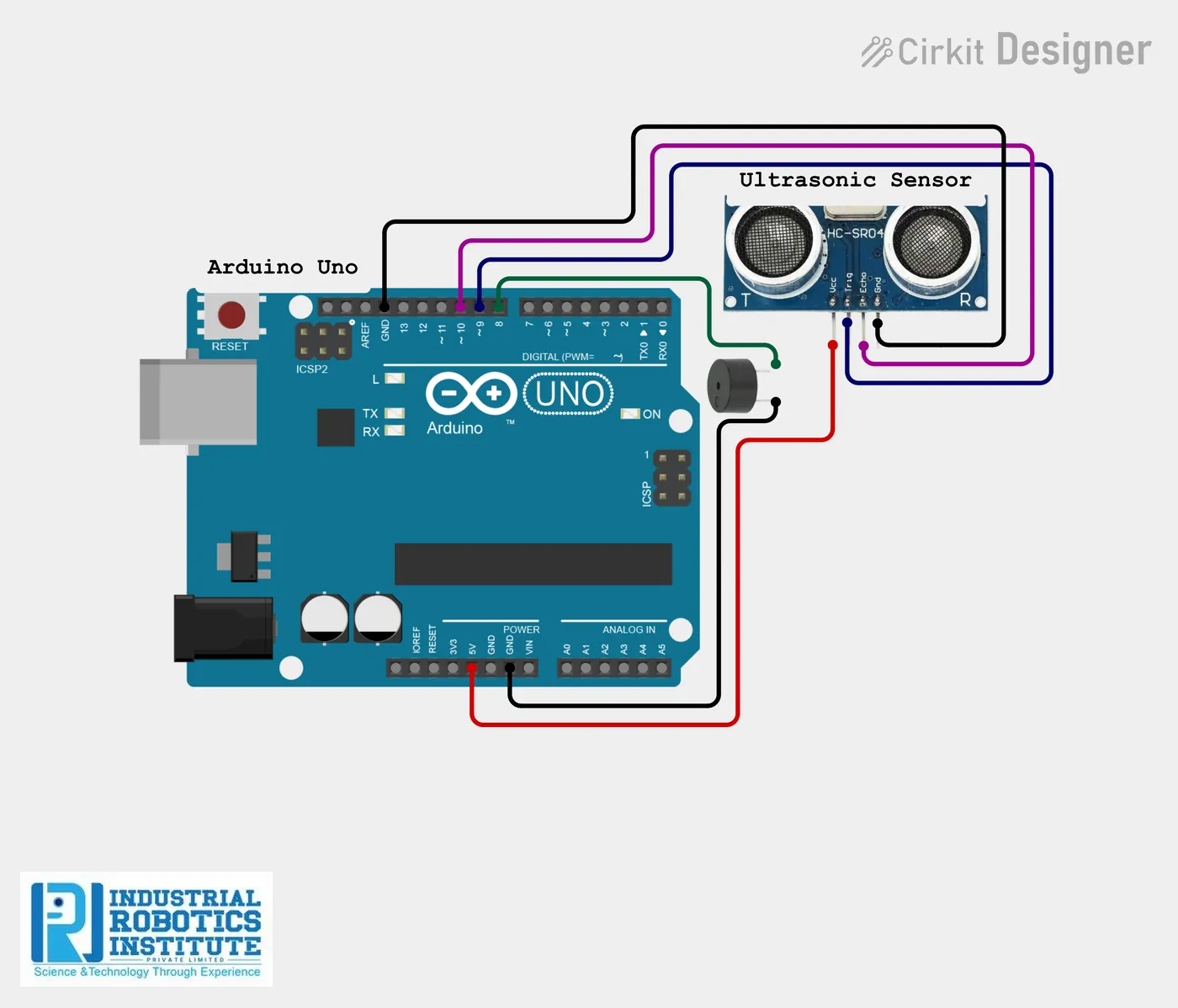
What is the Blind Navigation System Using Ultrasonic Sensor?
An assistive device that helps visually impaired people detect obstacles while walking. An HC-SR04 ultrasonic sensor measures the distance ahead; when something is closer than 20 cm, the Arduino sounds a buzzer. It can be fixed to a walking stick or carried in the hand.
How it works
- The ultrasonic sensor sends out a short sound pulse.
- The pulse bounces off an obstacle and returns to the sensor.
- The Arduino times the echo and works out the distance.
- If the obstacle is closer than 20 cm, the buzzer turns on to warn the user.
- The distance is also printed to the Serial Monitor for testing.
Parts list
| Component | Qty |
|---|---|
| Arduino Uno | 1 |
| HC-SR04 Ultrasonic Sensor | 1 |
| Buzzer | 1 |
| Vibration Motor (optional) | 1 |
| Breadboard | 1 |
| Jumper Wires | As needed |
| Battery / Power Bank | 1 |
Software
- Arduino IDE
Wiring and connections
| From | Connect to |
|---|---|
| Ultrasonic VCC | 5V |
| Ultrasonic GND | GND |
| Ultrasonic TRIG | Pin 9 |
| Ultrasonic ECHO | Pin 10 |
| Buzzer + | Pin 8 |
| Buzzer − | GND |
How to build the Blind Navigation System Using Ultrasonic Sensor
- Connect the ultrasonic sensor to 5V, GND, pin 9 (TRIG) and pin 10 (ECHO).
- Connect the buzzer to pin 8 and GND.
- Upload the code from the Arduino IDE.
- Open the Serial Monitor at 9600 baud and check the distance readings.
- Fix the sensor to the front of a walking stick, facing forward.
- Power it from a battery or power bank and test by walking towards a wall.
Blind Navigation System Using Ultrasonic Sensor code
Complete, tested Arduino C++ code for this project. Copy it into Arduino IDE and upload it to the Arduino Uno.
#define trigPin 9
#define echoPin 10
#define buzzer 8

long duration;
int distance;

void setup()
{
  pinMode(trigPin, OUTPUT);
  pinMode(echoPin, INPUT);
  pinMode(buzzer, OUTPUT);
  Serial.begin(9600);
}

void loop()
{
  digitalWrite(trigPin, LOW);
  delayMicroseconds(2);
  digitalWrite(trigPin, HIGH);
  delayMicroseconds(10);
  digitalWrite(trigPin, LOW);

  duration = pulseIn(echoPin, HIGH);
  distance = duration * 0.034 / 2;

  Serial.print("Distance: ");
  Serial.println(distance);

  if (distance < 20)
  {
    digitalWrite(buzzer, HIGH);
  }
  else
  {
    digitalWrite(buzzer, LOW);
  }

  delay(100);
}
Real-world uses
- Smart walking sticks
- Assistive technology
- Elderly mobility aids
- Learning ultrasonic sensing
Frequently asked questions
What is a Blind Navigation System Using Ultrasonic Sensor?
An assistive device that helps visually impaired people detect obstacles while walking. An HC-SR04 ultrasonic sensor measures the distance ahead; when something is closer than 20 cm, the Arduino sounds a buzzer.
What components are needed for the Blind Navigation System Using Ultrasonic Sensor?
You need: Arduino Uno (1), HC-SR04 Ultrasonic Sensor (1), Buzzer (1), Vibration Motor (optional) (1), Breadboard (1), Jumper Wires, Battery / Power Bank (1). Software: Arduino IDE.
Is the Blind Navigation System Using Ultrasonic Sensor project good for beginners?
Yes. It is rated beginner and takes about 1–2 hours to build, using the Arduino Uno. The guide on this page explains every connection and step.
Where can I get the code for the Blind Navigation System Using Ultrasonic Sensor?
The complete, tested Arduino C++ code is free on this page. Copy it into Arduino IDE and upload it to the board.
Can I buy a kit for the Blind Navigation System Using Ultrasonic Sensor?
Yes. IRI sells a kit with the parts for this project (PRJ-014). Message IRI on WhatsApp at +91 86060 82634 for the kit price and delivery details.