
Desk Presence Smart Power Saver Using ESP8266
Switches off your desk lamp and fan when you walk away.
Built and tested by Shahan Fathima K · Industrial Robotics Institute
What is the Desk Presence Smart Power Saver?
An energy saver for study or office desks. A PIR motion sensor checks whether someone is sitting at the desk. While someone is there, a relay keeps the lamp, fan or charger powered; if no movement is seen for a set time, the ESP8266 switches the relay off to stop wasting electricity.
How it works
- The PIR sensor detects movement at the desk.
- On movement, the ESP8266 turns the relay and status LED on and notes the time.
- If there is no movement for the delay time (10 s demo), the relay and LED turn off.
- The devices come back on as soon as someone returns.
Parts list
| Component | Qty |
|---|---|
| ESP8266 NodeMCU | 1 |
| PIR Motion Sensor | 1 |
| Relay Module | 1 |
| LED (optional indicator) | 1 |
| Resistor 220Ω (for LED) | 1 |
| Jumper Wires | As needed |
| Power Supply | 1 |
Software
- Arduino IDE
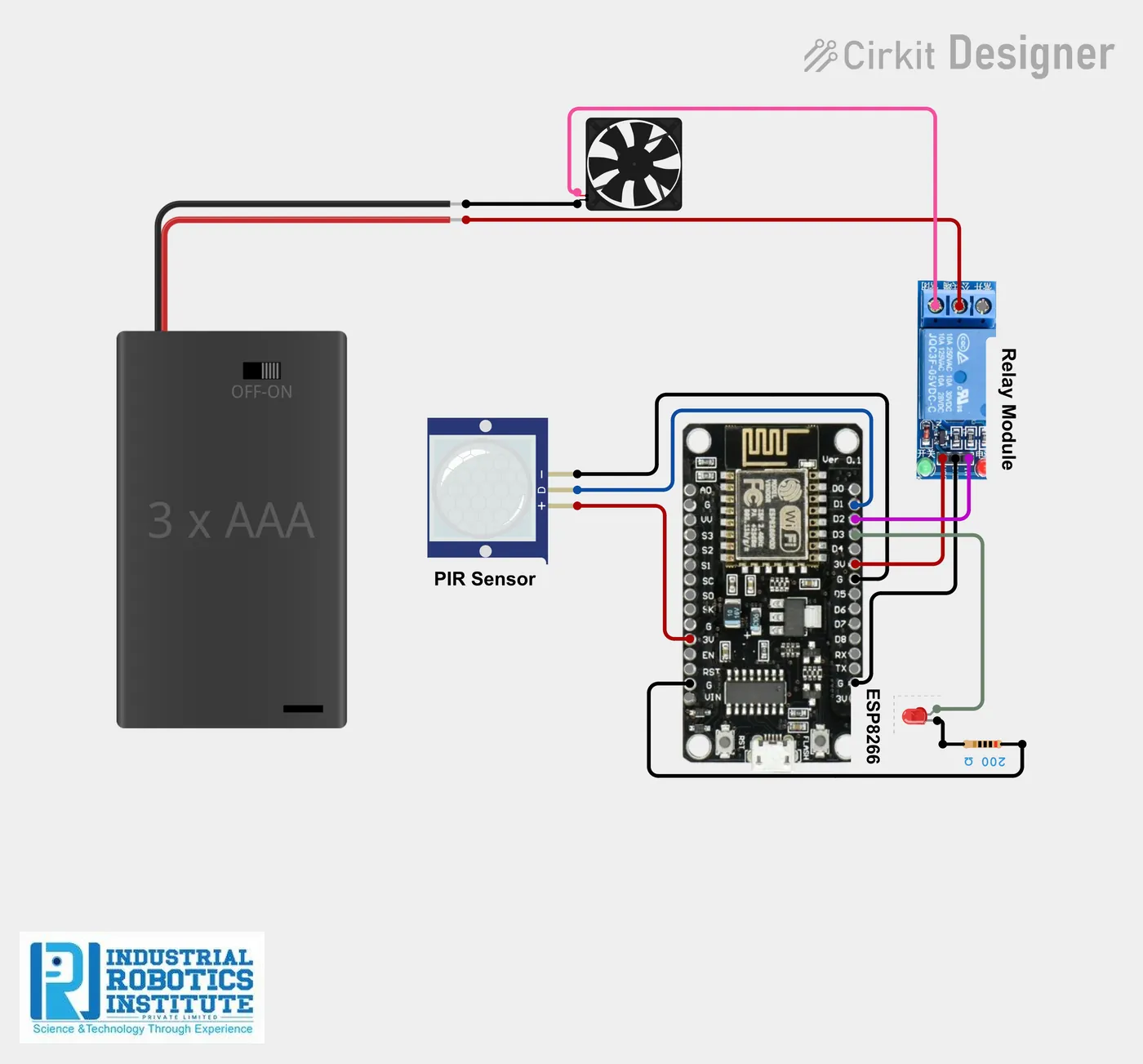
Wiring and connections
| From | Connect to |
|---|---|
| PIR VCC | 5V (VIN) |
| PIR GND | GND |
| PIR OUT | D1 |
| Relay IN | D2 |
| Relay VCC / GND | 5V (VIN) / GND |
| LED + (via resistor) | D3 |
| LED − | GND |
How to build the Desk Presence Smart Power Saver
- Connect the PIR sensor output to D1.
- Connect the relay module input to D2 and the optional LED to D3.
- Wire the device you want to control (lamp or fan) through the relay’s COM and NO terminals; get help if it is mains-powered.
- Set delayTime in the code (e.g. 300000 for 5 minutes).
- Upload the code and sit at the desk to test.
Desk Presence Smart Power Saver code
Complete, tested Arduino C++ code for this project. Copy it into Arduino IDE and upload it to the ESP8266 NodeMCU.
#define pirPin   D1
#define relayPin D2
#define ledPin   D3

unsigned long lastMotionTime = 0;
unsigned long delayTime = 10000;   // 10 s for demo

void setup()
{
  pinMode(pirPin, INPUT);
  pinMode(relayPin, OUTPUT);
  pinMode(ledPin, OUTPUT);
  digitalWrite(relayPin, LOW);     // devices OFF at start
}

void loop()
{
  int motion = digitalRead(pirPin);

  if (motion == HIGH)
  {
    lastMotionTime = millis();
    digitalWrite(relayPin, HIGH);  // devices ON
    digitalWrite(ledPin, HIGH);
  }

  if (millis() - lastMotionTime > delayTime)
  {
    digitalWrite(relayPin, LOW);   // devices OFF
    digitalWrite(ledPin, LOW);
  }

  delay(200);
}
Real-world uses
- Offices and study rooms
- Classrooms
- Libraries
- Energy-saving homes
Frequently asked questions
What is a Desk Presence Smart Power Saver?
An energy saver for study or office desks. A PIR motion sensor checks whether someone is sitting at the desk.
What components are needed for the Desk Presence Smart Power Saver?
You need: ESP8266 NodeMCU (1), PIR Motion Sensor (1), Relay Module (1), LED (optional indicator) (1), Resistor 220Ω (for LED) (1), Jumper Wires, Power Supply (1). Software: Arduino IDE.
Is the Desk Presence Smart Power Saver project good for beginners?
Yes. It is rated beginner and takes about 1–2 hours to build, using the ESP8266 NodeMCU. The guide on this page explains every connection and step.
Where can I get the code for the Desk Presence Smart Power Saver?
The complete, tested Arduino C++ code is free on this page. Copy it into Arduino IDE and upload it to the board.
Can I buy a kit for the Desk Presence Smart Power Saver?
Yes. IRI sells a kit with the parts for this project (PRJ-061). Message IRI on WhatsApp at +91 86060 82634 for the kit price and delivery details.