
IoT Accident Detection System with GPS Using ESP32
Detects a crash and sends an alert with the GPS location to your phone.
Built and tested by Drisya K S · Industrial Robotics Institute
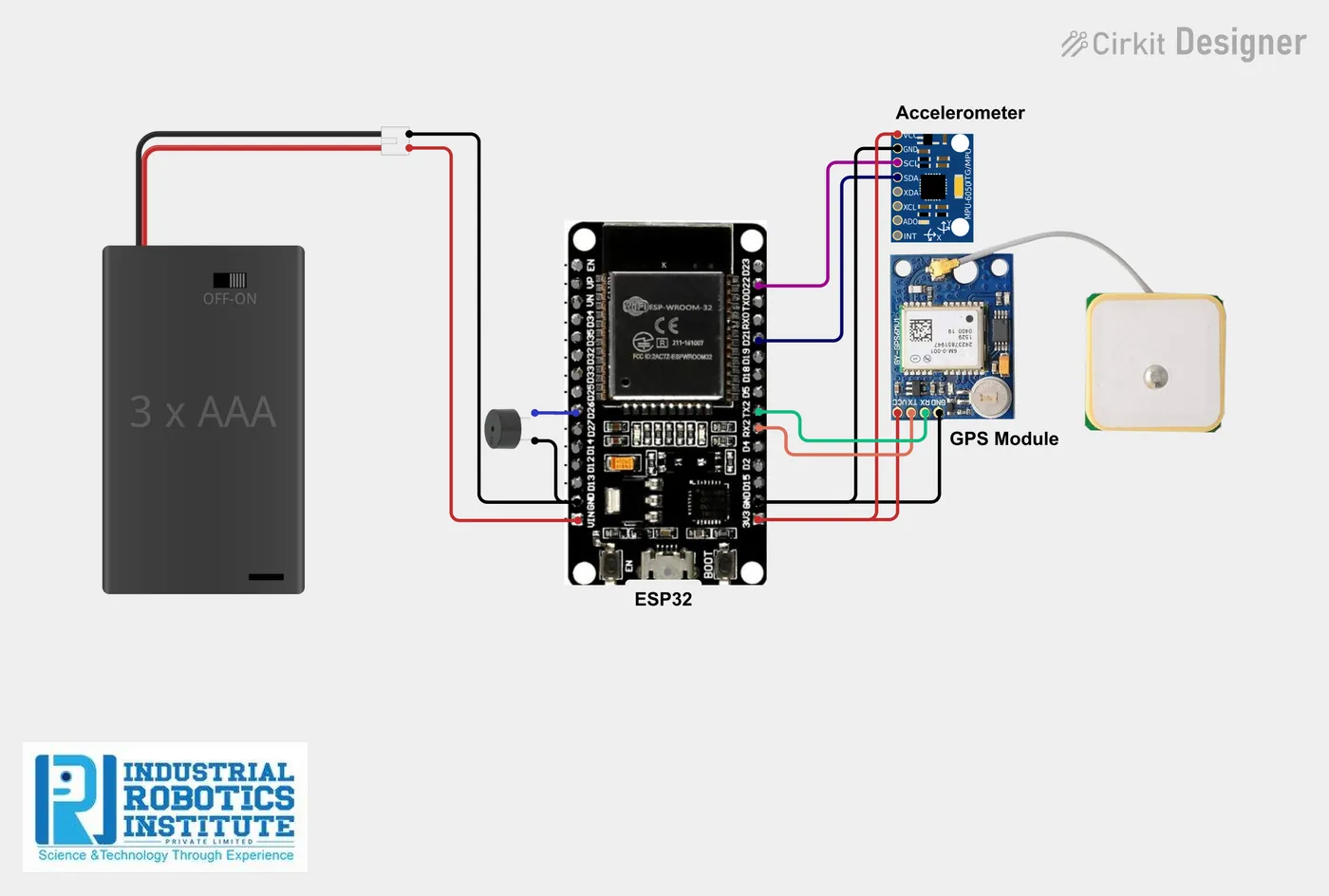
What is the IoT Accident Detection System with GPS?
An automatic accident alert for vehicles. An MPU6050 accelerometer watches for sudden impacts; when one happens, the ESP32 sounds a buzzer, reads the location from a Neo-6M GPS module, and sends "Accident Detected" with the latitude and longitude to the Blynk app so family or emergency contacts can respond quickly.
How it works
- The MPU6050 measures the vehicle’s acceleration on three axes.
- The ESP32 works out the total force; a sudden spike above the threshold means an impact.
- The GPS module provides the current latitude and longitude.
- The ESP32 sounds the buzzer and sends the alert and location to the Blynk app.
- Blynk shows the alert and coordinates on the phone.
Parts list
| Component | Qty |
|---|---|
| ESP32 Dev Board | 1 |
| Accelerometer (MPU6050) | 1 |
| GPS Module (Neo-6M) | 1 |
| Buzzer | 1 |
| Jumper Wires / Breadboard | As needed |
| 5V Power Supply or Battery | 1 |
Software
- Arduino IDE
- Blynk IoT app
- MPU6050 library
- TinyGPSPlus library
Wiring and connections
| From | Connect to |
|---|---|
| MPU6050 VCC | 3.3V |
| MPU6050 GND | GND |
| MPU6050 SDA | GPIO 21 |
| MPU6050 SCL | GPIO 22 |
| GPS VCC | 3.3V / 5V |
| GPS GND | GND |
| GPS TX | GPIO 16 (RX2) |
| GPS RX | GPIO 17 (TX2) |
| Buzzer + | GPIO 26 |
| Buzzer − | GND |
How to build the IoT Accident Detection System with GPS
- Connect the MPU6050 to 3.3V, GND, GPIO 21 (SDA) and GPIO 22 (SCL).
- Connect the GPS module TX to GPIO 16 and RX to GPIO 17.
- Connect the buzzer to GPIO 26.
- In the Blynk app, create a template with datastreams V1 (string), V2 and V3 (double), and add widgets for them.
- Install the MPU6050 and TinyGPSPlus libraries.
- Put your Blynk template ID, auth token and Wi-Fi details in the code and upload it.
- Take the GPS outdoors for its first fix, then test with a sharp tap on the sensor.
IoT Accident Detection System with GPS code
Complete, tested Arduino C++ code for this project. Copy it into Arduino IDE and upload it to the ESP32.
#define BLYNK_TEMPLATE_ID "YourTemplateID"
#define BLYNK_TEMPLATE_NAME "Accident Detector"
#define BLYNK_AUTH_TOKEN "YourAuthToken"

#include <Wire.h>
#include <WiFi.h>
#include <MPU6050.h>
#include <TinyGPS++.h>
#include <BlynkSimpleEsp32.h>

char ssid[] = "YourWiFiName";
char pass[] = "YourWiFiPassword";

MPU6050 mpu;
TinyGPSPlus gps;
HardwareSerial gpsSerial(2);   // UART2: RX = 16, TX = 17

#define buzzerPin 26
float accidentThreshold = 2.5;  // in g; adjust based on testing

void setup() {
  Serial.begin(115200);
  Wire.begin();
  mpu.initialize();
  pinMode(buzzerPin, OUTPUT);
  gpsSerial.begin(9600, SERIAL_8N1, 16, 17);
  Blynk.begin(BLYNK_AUTH_TOKEN, ssid, pass);
}

void loop() {
  // Keep reading GPS data
  while (gpsSerial.available() > 0) gps.encode(gpsSerial.read());

  // Read accelerometer
  int16_t ax, ay, az;
  mpu.getAcceleration(&ax, &ay, &az);
  float g = sqrt((float)ax * ax + (float)ay * ay + (float)az * az) / 16384.0;

  // Accident detection
  if (g > accidentThreshold) {
    digitalWrite(buzzerPin, HIGH);

    double latitude = gps.location.lat();
    double longitude = gps.location.lng();

    Blynk.virtualWrite(V1, "Accident Detected!");
    Blynk.virtualWrite(V2, latitude);
    Blynk.virtualWrite(V3, longitude);
    delay(5000);
  } else {
    digitalWrite(buzzerPin, LOW);
  }

  Blynk.run();
  delay(100);
}
Real-world uses
- Cars and bikes
- Delivery and taxi fleets
- School buses
- Emergency response systems
Frequently asked questions
What is a IoT Accident Detection System with GPS?
An automatic accident alert for vehicles. An MPU6050 accelerometer watches for sudden impacts; when one happens, the ESP32 sounds a buzzer, reads the location from a Neo-6M GPS module, and sends "Accident Detected" with the latitude and longitude to the Blynk app so family or emergency contacts can respond quickly.
What components are needed for the IoT Accident Detection System with GPS?
You need: ESP32 Dev Board (1), Accelerometer (MPU6050) (1), GPS Module (Neo-6M) (1), Buzzer (1), Jumper Wires / Breadboard, 5V Power Supply or Battery (1). Software: Arduino IDE, Blynk IoT app, MPU6050 library, TinyGPSPlus library.
Is the IoT Accident Detection System with GPS project good for beginners?
It is rated advanced and takes about 4–5 hours to build, using the ESP32. The guide on this page explains every connection and step.
Where can I get the code for the IoT Accident Detection System with GPS?
The complete, tested Arduino C++ code is free on this page. Copy it into Arduino IDE and upload it to the board.
Can I buy a kit for the IoT Accident Detection System with GPS?
Yes. IRI sells a kit with the parts for this project (PRJ-053). Message IRI on WhatsApp at +91 86060 82634 for the kit price and delivery details.