
Snake Game Using ESP32, OLED and Joystick
The classic snake game on a tiny OLED screen, steered with a joystick.
Built and tested by Vishnu M · Industrial Robotics Institute
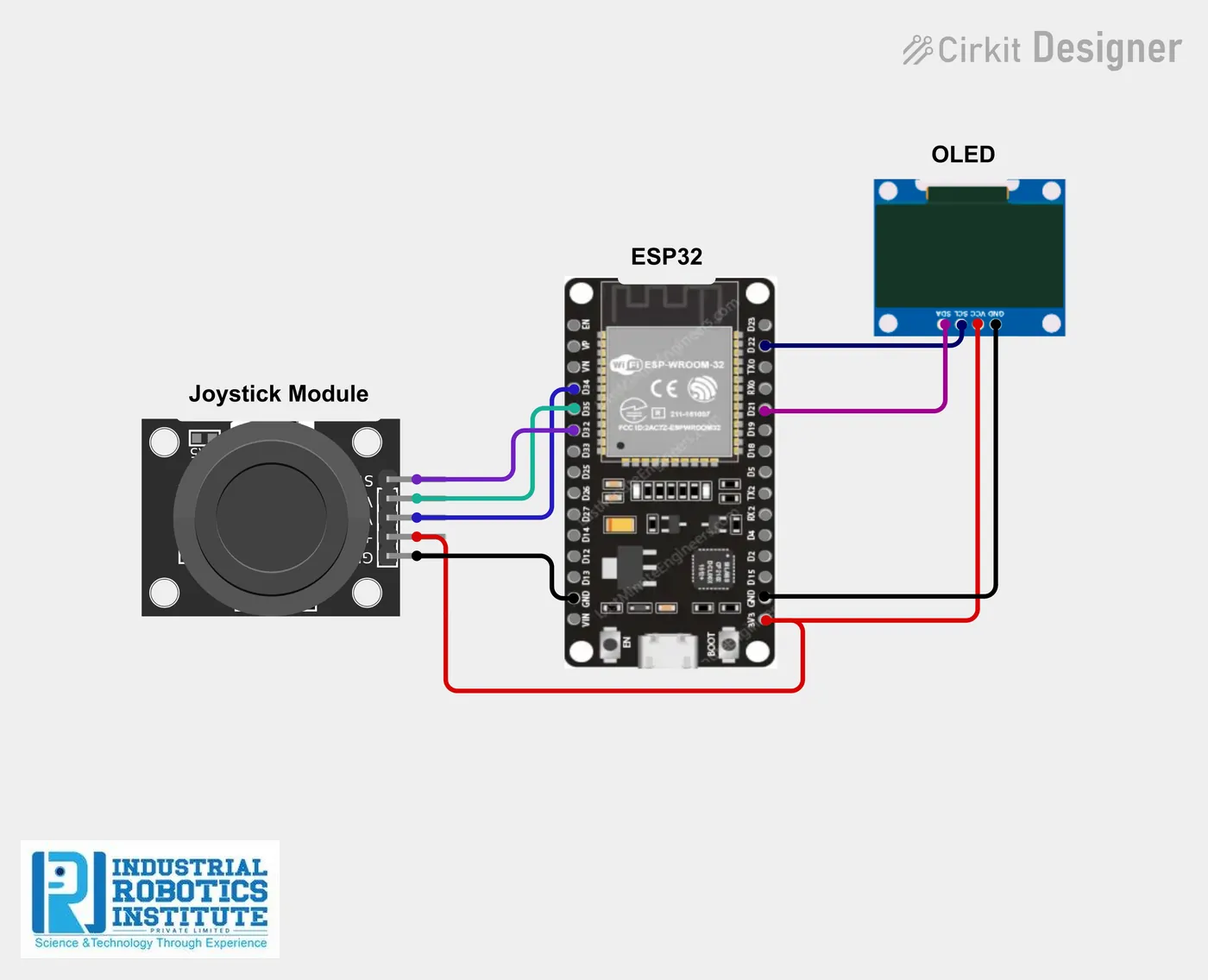
What is the Snake Game Using ESP32, OLED and Joystick?
A pocket version of the classic arcade game. The ESP32 draws the snake and its food on a 128×64 SSD1306 OLED display, and a joystick steers it. Each time the snake eats the food it grows longer and new food appears somewhere random.
How it works
- The ESP32 draws the snake and a food block on the OLED.
- It reads the joystick’s X and Y positions to choose up, down, left or right.
- Every 120 ms the snake moves one step; each body part follows the one ahead.
- When the head reaches the food, the snake grows and new food appears at random.
Parts list
| Component | Qty |
|---|---|
| ESP32 Dev Board | 1 |
| SSD1306 128×64 OLED Display (I2C) | 1 |
| Joystick Module | 1 |
| Breadboard | 1 |
| Jumper Wires | As needed |
| Buzzer (optional) | 1 |
Software
- Arduino IDE
- Adafruit GFX library
- Adafruit SSD1306 library
Wiring and connections
| From | Connect to |
|---|---|
| OLED VCC | 3.3V |
| OLED GND | GND |
| OLED SDA | GPIO 21 |
| OLED SCL | GPIO 22 |
| Joystick VCC | 3.3V |
| Joystick GND | GND |
| Joystick VRX | GPIO 34 |
| Joystick VRY | GPIO 35 |
| Joystick SW | GPIO 32 |
How to build the Snake Game Using ESP32, OLED and Joystick
- Connect the OLED to 3.3V, GND, GPIO 21 (SDA) and GPIO 22 (SCL).
- Connect the joystick to 3.3V, GND, GPIO 34 (VRX), GPIO 35 (VRY) and GPIO 32 (SW).
- Install the Adafruit GFX and Adafruit SSD1306 libraries from the Library Manager.
- Upload the code from the Arduino IDE.
- Move the joystick to steer the snake to the food.
- Change delay(120) to make the game faster or slower.
Snake Game Using ESP32, OLED and Joystick code
Complete, tested Arduino C++ code for this project. Copy it into Arduino IDE and upload it to the ESP32.
#include <Wire.h>
#include <Adafruit_GFX.h>
#include <Adafruit_SSD1306.h>

#define SCREEN_WIDTH 128
#define SCREEN_HEIGHT 64
Adafruit_SSD1306 display(SCREEN_WIDTH, SCREEN_HEIGHT, &Wire, -1);

#define VRX 34
#define VRY 35
#define SIZE 4
#define MAX_SNAKE_LENGTH 50

int snakeX[MAX_SNAKE_LENGTH];
int snakeY[MAX_SNAKE_LENGTH];
int snakeLength = 5;

int foodX;
int foodY;

int dirX = 1;
int dirY = 0;

void spawnFood()
{
  foodX = random(0, SCREEN_WIDTH / SIZE) * SIZE;
  foodY = random(0, SCREEN_HEIGHT / SIZE) * SIZE;
}

void setup()
{
  pinMode(VRX, INPUT);
  pinMode(VRY, INPUT);

  display.begin(SSD1306_SWITCHCAPVCC, 0x3C);
  display.clearDisplay();

  for (int i = 0; i < snakeLength; i++)
  {
    snakeX[i] = 20 - i * SIZE;
    snakeY[i] = 20;
  }
  spawnFood();
}

void loop()
{
  int xValue = analogRead(VRX);
  int yValue = analogRead(VRY);

  if (xValue < 1500 && dirX != 1)  { dirX = -1; dirY = 0; }
  if (xValue > 2500 && dirX != -1) { dirX = 1;  dirY = 0; }
  if (yValue < 1500 && dirY != -1) { dirX = 0;  dirY = 1; }
  if (yValue > 2500 && dirY != 1)  { dirX = 0;  dirY = -1; }

  for (int i = snakeLength - 1; i > 0; i--)
  {
    snakeX[i] = snakeX[i - 1];
    snakeY[i] = snakeY[i - 1];
  }

  snakeX[0] += dirX * SIZE;
  snakeY[0] += dirY * SIZE;

  if (snakeX[0] == foodX && snakeY[0] == foodY)
  {
    if (snakeLength < MAX_SNAKE_LENGTH) snakeLength++;
    spawnFood();
  }

  display.clearDisplay();
  display.fillRect(foodX, foodY, SIZE, SIZE, WHITE);
  for (int i = 0; i < snakeLength; i++)
  {
    display.fillRect(snakeX[i], snakeY[i], SIZE, SIZE, WHITE);
  }
  display.display();

  delay(120);
}
Real-world uses
- Learning game logic
- OLED graphics practice
- Handheld game builds
- Coding clubs
Frequently asked questions
What is a Snake Game Using ESP32, OLED and Joystick?
A pocket version of the classic arcade game. The ESP32 draws the snake and its food on a 128×64 SSD1306 OLED display, and a joystick steers it.
What components are needed for the Snake Game Using ESP32, OLED and Joystick?
You need: ESP32 Dev Board (1), SSD1306 128×64 OLED Display (I2C) (1), Joystick Module (1), Breadboard (1), Jumper Wires, Buzzer (optional) (1). Software: Arduino IDE, Adafruit GFX library, Adafruit SSD1306 library.
Is the Snake Game Using ESP32, OLED and Joystick project good for beginners?
It is rated intermediate and takes about 2–3 hours to build, using the ESP32. The guide on this page explains every connection and step.
Where can I get the code for the Snake Game Using ESP32, OLED and Joystick?
The complete, tested Arduino C++ code is free on this page. Copy it into Arduino IDE and upload it to the board.
Can I buy a kit for the Snake Game Using ESP32, OLED and Joystick?
Yes. IRI sells a kit with the parts for this project (PRJ-031). Message IRI on WhatsApp at +91 86060 82634 for the kit price and delivery details.