
Smart Mirror Notification Display Using ESP8266
A mirror display that wakes up with a greeting when you stand in front of it.
Built and tested by Shahan Fathima K · Industrial Robotics Institute
What is the Smart Mirror Notification Display?
An interactive mirror display. A PIR sensor notices when someone steps in front of the mirror and the ESP8266 turns on a 16×2 LCD showing a greeting and message. When nobody is there, the backlight switches off to save power.
How it works
- On start-up the LCD shows "Smart Mirror".
- The PIR sensor detects a person in front of the mirror.
- The LCD backlight turns on and shows "Hello User / Stay Focused".
- When nobody is detected, the backlight turns off.
Parts list
| Component | Qty |
|---|---|
| ESP8266 NodeMCU | 1 |
| PIR Motion Sensor | 1 |
| 16×2 LCD with I2C Module | 1 |
| Jumper Wires | As needed |
| Power Supply | 1 |
Software
- Arduino IDE
- LiquidCrystal_I2C library
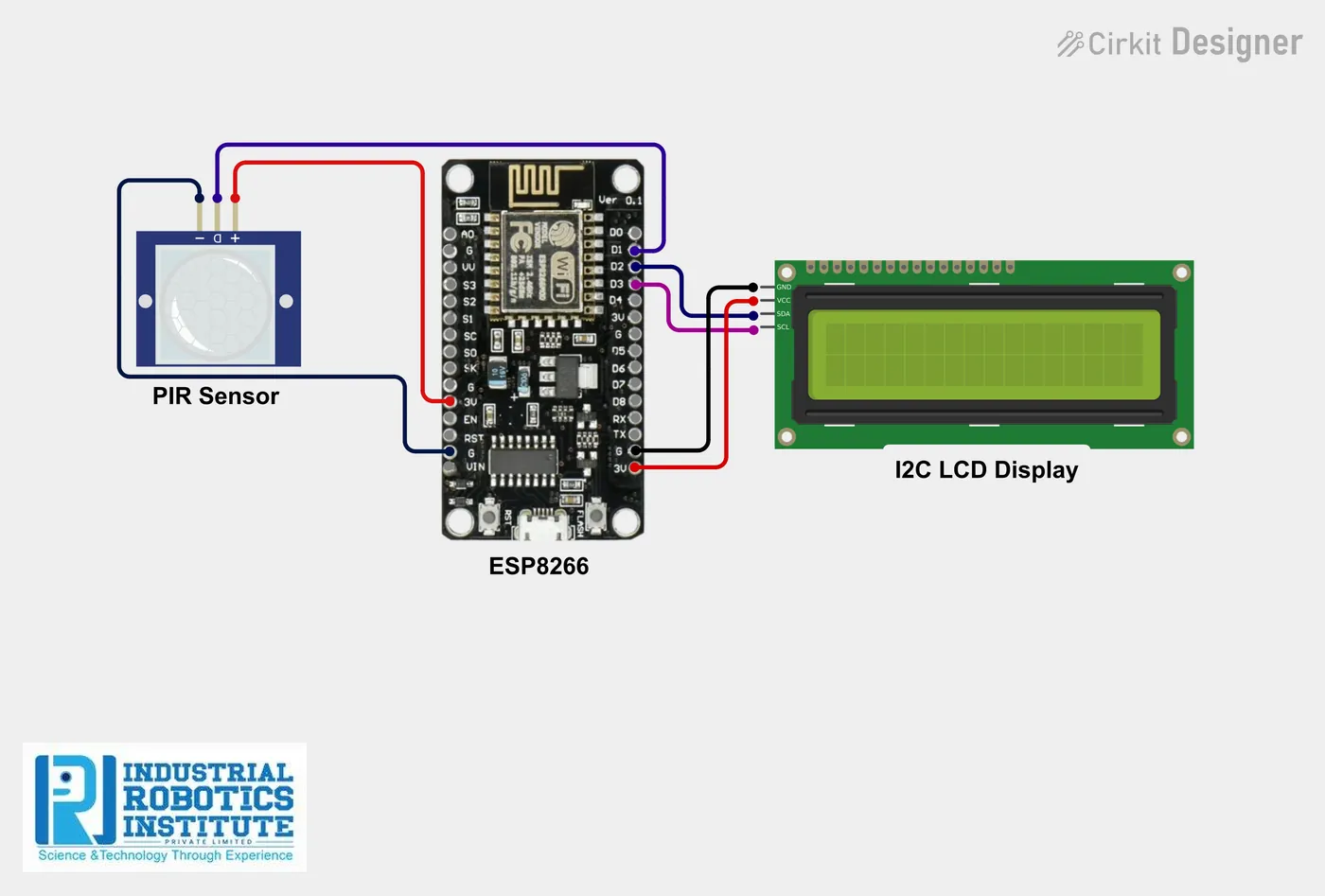
Wiring and connections
| From | Connect to |
|---|---|
| PIR VCC | 5V (VIN) |
| PIR GND | GND |
| PIR OUT | D1 |
| LCD VCC | 5V (VIN) |
| LCD GND | GND |
| LCD SDA | D2 |
| LCD SCL | D3 |
How to build the Smart Mirror Notification Display
- Connect the PIR sensor output to D1.
- Connect the I2C LCD to D2 (SDA) and D3 (SCL).
- Install the LiquidCrystal_I2C library.
- Edit the messages in the code if you like, then upload it.
- Fix the LCD behind or beside a mirror and the PIR facing the user.
Smart Mirror Notification Display code
Complete, tested Arduino C++ code for this project. Copy it into Arduino IDE and upload it to the ESP8266 NodeMCU.
#include <Wire.h>
#include <LiquidCrystal_I2C.h>

#define pirPin D1

LiquidCrystal_I2C lcd(0x27, 16, 2);

void setup()
{
  pinMode(pirPin, INPUT);

  Wire.begin(D2, D3);   // SDA = D2, SCL = D3
  lcd.init();
  lcd.backlight();
  lcd.print("Smart Mirror");
  delay(2000);
  lcd.clear();
}

void loop()
{
  int motion = digitalRead(pirPin);

  if (motion == HIGH)
  {
    lcd.backlight();
    lcd.setCursor(0, 0);
    lcd.print("Hello User");
    lcd.setCursor(0, 1);
    lcd.print("Stay Focused");
  }
  else
  {
    lcd.noBacklight();
  }

  delay(500);
}
Real-world uses
- Bathroom and bedroom mirrors
- Shop and salon displays
- Smart home projects
- Learning presence sensing
Frequently asked questions
What is a Smart Mirror Notification Display?
An interactive mirror display. A PIR sensor notices when someone steps in front of the mirror and the ESP8266 turns on a 16×2 LCD showing a greeting and message.
What components are needed for the Smart Mirror Notification Display?
You need: ESP8266 NodeMCU (1), PIR Motion Sensor (1), 16×2 LCD with I2C Module (1), Jumper Wires, Power Supply (1). Software: Arduino IDE, LiquidCrystal_I2C library.
Is the Smart Mirror Notification Display project good for beginners?
Yes. It is rated beginner and takes about 1–2 hours to build, using the ESP8266 NodeMCU. The guide on this page explains every connection and step.
Where can I get the code for the Smart Mirror Notification Display?
The complete, tested Arduino C++ code is free on this page. Copy it into Arduino IDE and upload it to the board.
Can I buy a kit for the Smart Mirror Notification Display?
Yes. IRI sells a kit with the parts for this project (PRJ-062). Message IRI on WhatsApp at +91 86060 82634 for the kit price and delivery details.