
Library Book Fetching Robot Using Arduino
Follows a line to a library section, stops and works its book arm.
Built and tested by Shahan Fathima K · Industrial Robotics Institute
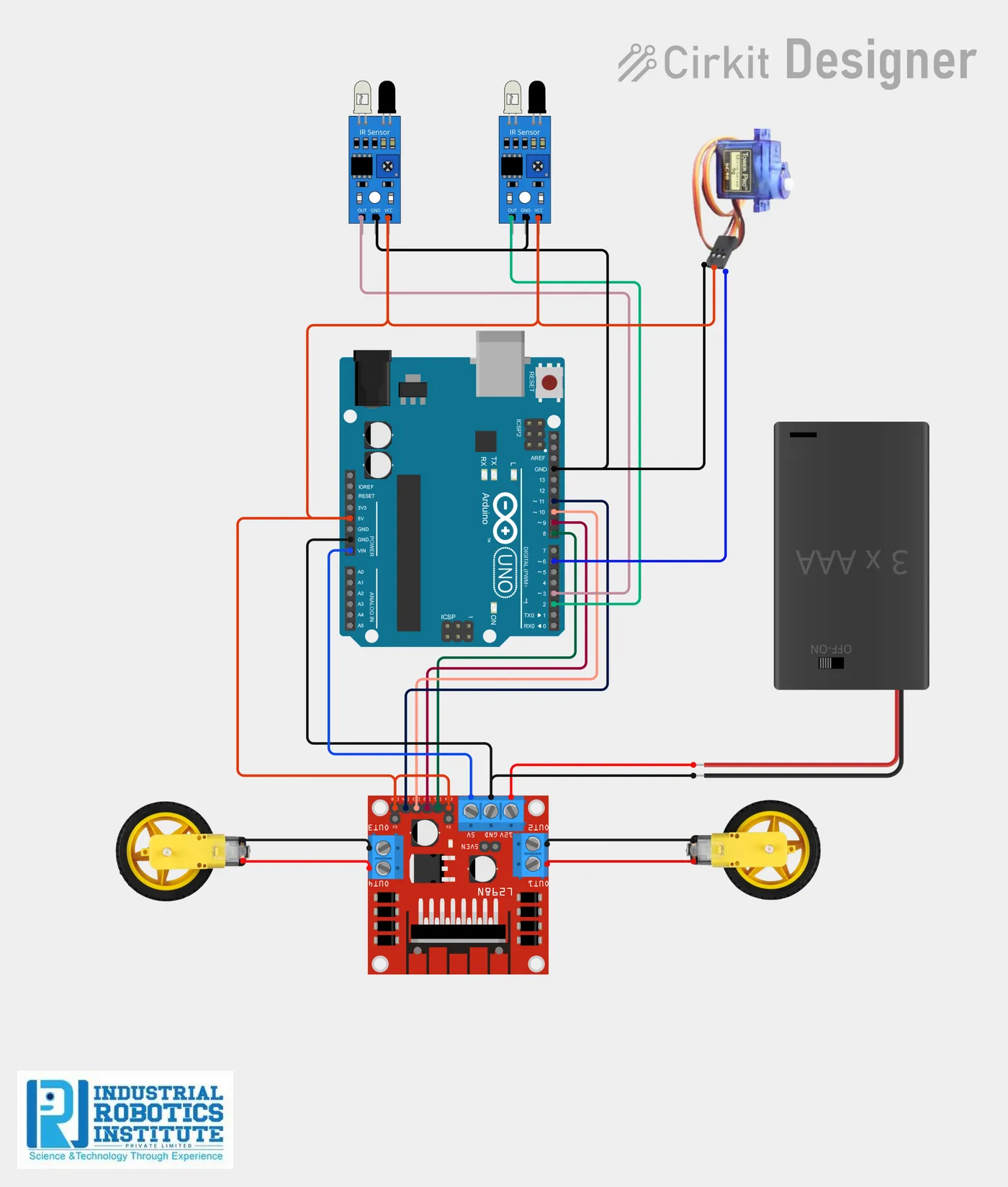
What is the Library Book Fetching Robot?
A robot that helps move books around a library. It follows a line on the floor with two IR sensors; when it reaches a marked stop (where both sensors leave the line), it halts and a servo arm swings to pick up or drop off a book, then continues.
How it works
- Two IR sensors follow the line; the Arduino steers with the L298N.
- Each library section is marked by a gap or pattern in the line.
- When both sensors lose the line, the robot stops at that section.
- The servo arm turns to 90° and back to pick up or drop a book.
Parts list
| Component | Qty |
|---|---|
| Arduino Uno | 1 |
| L298N Motor Driver Module | 1 |
| DC Motors with Wheels | 2 |
| Robot Chassis | 1 |
| IR Sensor Modules | 2 |
| Servo Motor (SG90/MG90S) | 1 |
| Battery Pack | 1 |
| Jumper Wires | As needed |
Software
- Arduino IDE
- Servo library
Wiring and connections
| From | Connect to |
|---|---|
| Left IR OUT | Pin 2 |
| Right IR OUT | Pin 3 |
| IR VCC / GND | 5V / GND |
| L298N IN1 | Pin 8 |
| L298N IN2 | Pin 9 |
| L298N IN3 | Pin 10 |
| L298N IN4 | Pin 11 |
| L298N VCC | Battery + |
| Servo signal | Pin 6 |
| Servo VCC / GND | 5V / GND |
How to build the Library Book Fetching Robot
- Build the line-following chassis with two motors and the IR sensors at the front.
- Mount the servo with a small arm or hook on top.
- Wire the sensors to pins 2–3, the L298N to 8–11 and the servo to pin 6.
- Lay a black-tape route with a gap at each section stop.
- Upload the code and test the route.
Library Book Fetching Robot code
Complete, tested Arduino C++ code for this project. Copy it into Arduino IDE and upload it to the Arduino Uno.
#include <Servo.h>

#define leftSensor  2
#define rightSensor 3

#define in1 8
#define in2 9
#define in3 10
#define in4 11

#define servoPin 6

Servo arm;

void forward()   { digitalWrite(in1, HIGH); digitalWrite(in2, LOW);  digitalWrite(in3, HIGH); digitalWrite(in4, LOW);  }
void leftTurn()  { digitalWrite(in1, LOW);  digitalWrite(in2, HIGH); digitalWrite(in3, HIGH); digitalWrite(in4, LOW);  }
void rightTurn() { digitalWrite(in1, HIGH); digitalWrite(in2, LOW);  digitalWrite(in3, LOW);  digitalWrite(in4, HIGH); }
void stopRobot() { digitalWrite(in1, LOW);  digitalWrite(in2, LOW);  digitalWrite(in3, LOW);  digitalWrite(in4, LOW);  }

void pickBook()
{
  arm.write(90);
  delay(1000);
  arm.write(0);
}

void setup()
{
  pinMode(leftSensor, INPUT);
  pinMode(rightSensor, INPUT);
  pinMode(in1, OUTPUT);
  pinMode(in2, OUTPUT);
  pinMode(in3, OUTPUT);
  pinMode(in4, OUTPUT);

  arm.attach(servoPin);
  arm.write(0);
}

void loop()
{
  int left = digitalRead(leftSensor);    // LOW = on line
  int right = digitalRead(rightSensor);

  if (left == LOW && right == LOW)        forward();
  else if (left == HIGH && right == LOW)  leftTurn();
  else if (left == LOW && right == HIGH)  rightTurn();
  else
  {
    stopRobot();     // reached a section
    pickBook();
  }

  delay(100);
}
Real-world uses
- School and college libraries
- Document rooms
- Office mail delivery
- Service robot demos
Frequently asked questions
What is a Library Book Fetching Robot?
A robot that helps move books around a library. It follows a line on the floor with two IR sensors; when it reaches a marked stop (where both sensors leave the line), it halts and a servo arm swings to pick up or drop off a book, then continues.
What components are needed for the Library Book Fetching Robot?
You need: Arduino Uno (1), L298N Motor Driver Module (1), DC Motors with Wheels (2), Robot Chassis (1), IR Sensor Modules (2), Servo Motor (SG90/MG90S) (1), Battery Pack (1), Jumper Wires. Software: Arduino IDE, Servo library.
Is the Library Book Fetching Robot project good for beginners?
It is rated intermediate and takes about 3–4 hours to build, using the Arduino Uno. The guide on this page explains every connection and step.
Where can I get the code for the Library Book Fetching Robot?
The complete, tested Arduino C++ code is free on this page. Copy it into Arduino IDE and upload it to the board.
Can I buy a kit for the Library Book Fetching Robot?
Yes. IRI sells a kit with the parts for this project (PRJ-071). Message IRI on WhatsApp at +91 86060 82634 for the kit price and delivery details.