
Smart Water Bottle Reminder Using ESP8266
Beeps and lights up when you haven’t picked up your bottle for a while.
Built and tested by Shahan Fathima K · Industrial Robotics Institute
What is the Smart Water Bottle Reminder?
A hydration reminder for your water bottle. A tilt (or water level) sensor notices each time the bottle is picked up to drink. If it isn’t used for a set time, the ESP8266 turns on an LED and buzzer to remind you to drink water.
How it works
- The tilt sensor goes HIGH whenever the bottle is tipped to drink.
- Each time, the ESP8266 resets its timer and turns the alert off.
- If no drink is detected within the reminder interval, the LED and buzzer turn on.
- The demo interval is 10 seconds; set it to 30–60 minutes for real use.
Parts list
| Component | Qty |
|---|---|
| ESP8266 NodeMCU | 1 |
| Tilt Sensor or Water Level Sensor | 1 |
| Buzzer | 1 |
| LED | 1 |
| Resistor 220Ω (for LED) | 1 |
| Jumper Wires | As needed |
| Power Supply | 1 |
Software
- Arduino IDE
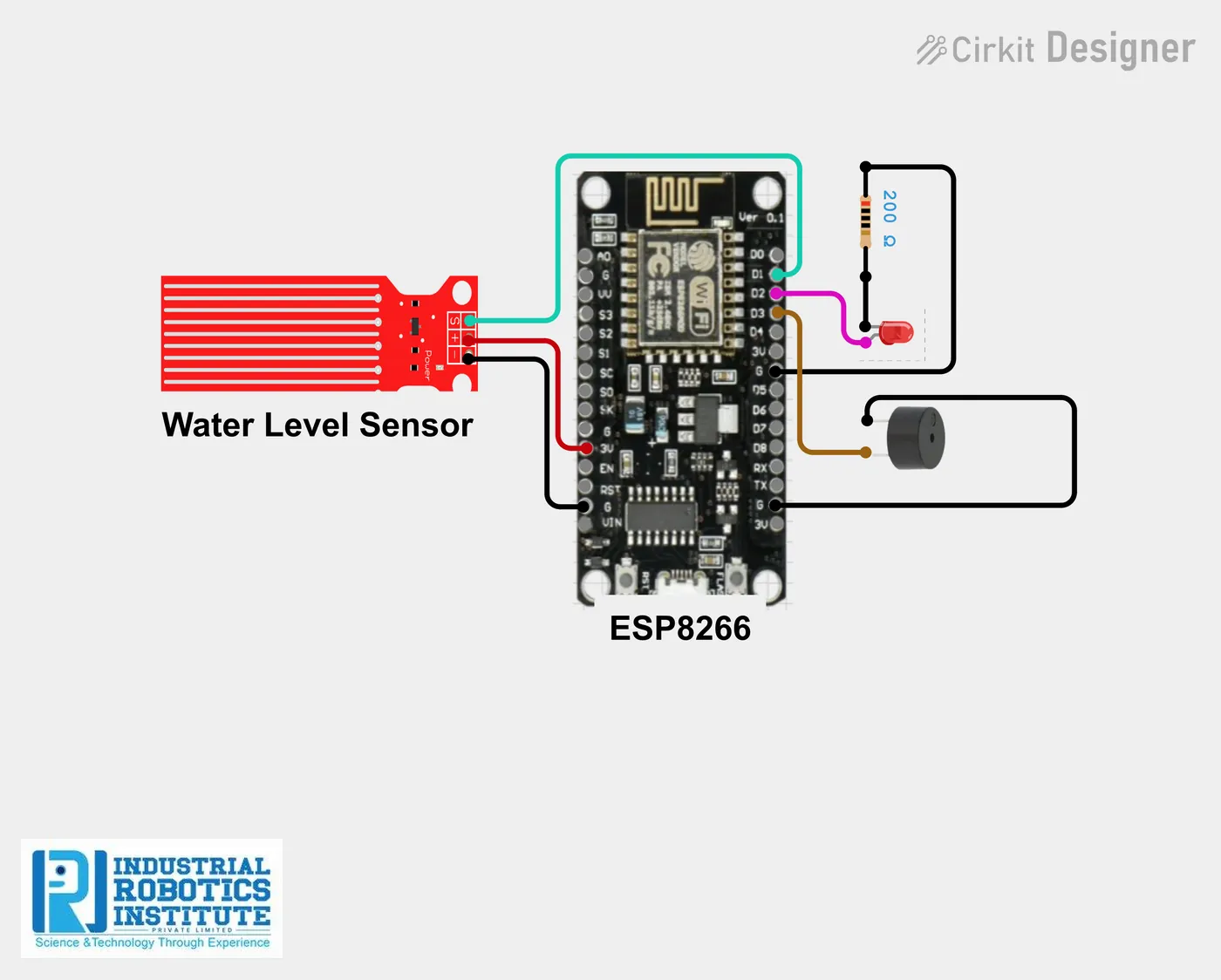
Wiring and connections
| From | Connect to |
|---|---|
| Sensor VCC | 3.3V |
| Sensor GND | GND |
| Sensor OUT | D1 |
| LED + (via resistor) | D2 |
| LED − | GND |
| Buzzer + | D3 |
| Buzzer − | GND |
How to build the Smart Water Bottle Reminder
- Connect the tilt sensor to 3.3V, GND and D1.
- Connect the LED through a resistor to D2, and the buzzer to D3.
- Fix the sensor and electronics to the bottle or its holder.
- Change reminderInterval in the code to your preferred time in milliseconds (e.g. 1800000 for 30 minutes).
- Upload the code from the Arduino IDE and test by leaving the bottle alone.
Smart Water Bottle Reminder code
Complete, tested Arduino C++ code for this project. Copy it into Arduino IDE and upload it to the ESP8266 NodeMCU.
#define sensorPin D1
#define ledPin    D2
#define buzzer    D3

unsigned long lastDrinkTime = 0;
unsigned long reminderInterval = 10000;   // 10 s for demo

void setup()
{
  pinMode(sensorPin, INPUT);
  pinMode(ledPin, OUTPUT);
  pinMode(buzzer, OUTPUT);
}

void loop()
{
  int sensorState = digitalRead(sensorPin);

  if (sensorState == HIGH)          // bottle tilted / used
  {
    lastDrinkTime = millis();
  }

  if (millis() - lastDrinkTime > reminderInterval)
  {
    digitalWrite(ledPin, HIGH);
    digitalWrite(buzzer, HIGH);
  }
  else
  {
    digitalWrite(ledPin, LOW);
    digitalWrite(buzzer, LOW);
  }

  delay(200);
}
Real-world uses
- Office and study desks
- Elderly hydration care
- Sports and gyms
- Healthy habit gadgets
Frequently asked questions
What is a Smart Water Bottle Reminder?
A hydration reminder for your water bottle. A tilt (or water level) sensor notices each time the bottle is picked up to drink.
What components are needed for the Smart Water Bottle Reminder?
You need: ESP8266 NodeMCU (1), Tilt Sensor or Water Level Sensor (1), Buzzer (1), LED (1), Resistor 220Ω (for LED) (1), Jumper Wires, Power Supply (1). Software: Arduino IDE.
Is the Smart Water Bottle Reminder project good for beginners?
Yes. It is rated beginner and takes about 1–2 hours to build, using the ESP8266 NodeMCU. The guide on this page explains every connection and step.
Where can I get the code for the Smart Water Bottle Reminder?
The complete, tested Arduino C++ code is free on this page. Copy it into Arduino IDE and upload it to the board.
Can I buy a kit for the Smart Water Bottle Reminder?
Yes. IRI sells a kit with the parts for this project (PRJ-050). Message IRI on WhatsApp at +91 86060 82634 for the kit price and delivery details.