
Table Robot (Edge Avoiding) Using Arduino
A little robot that roams a table and never falls off the edge.
Built and tested by Anju.A · Industrial Robotics Institute
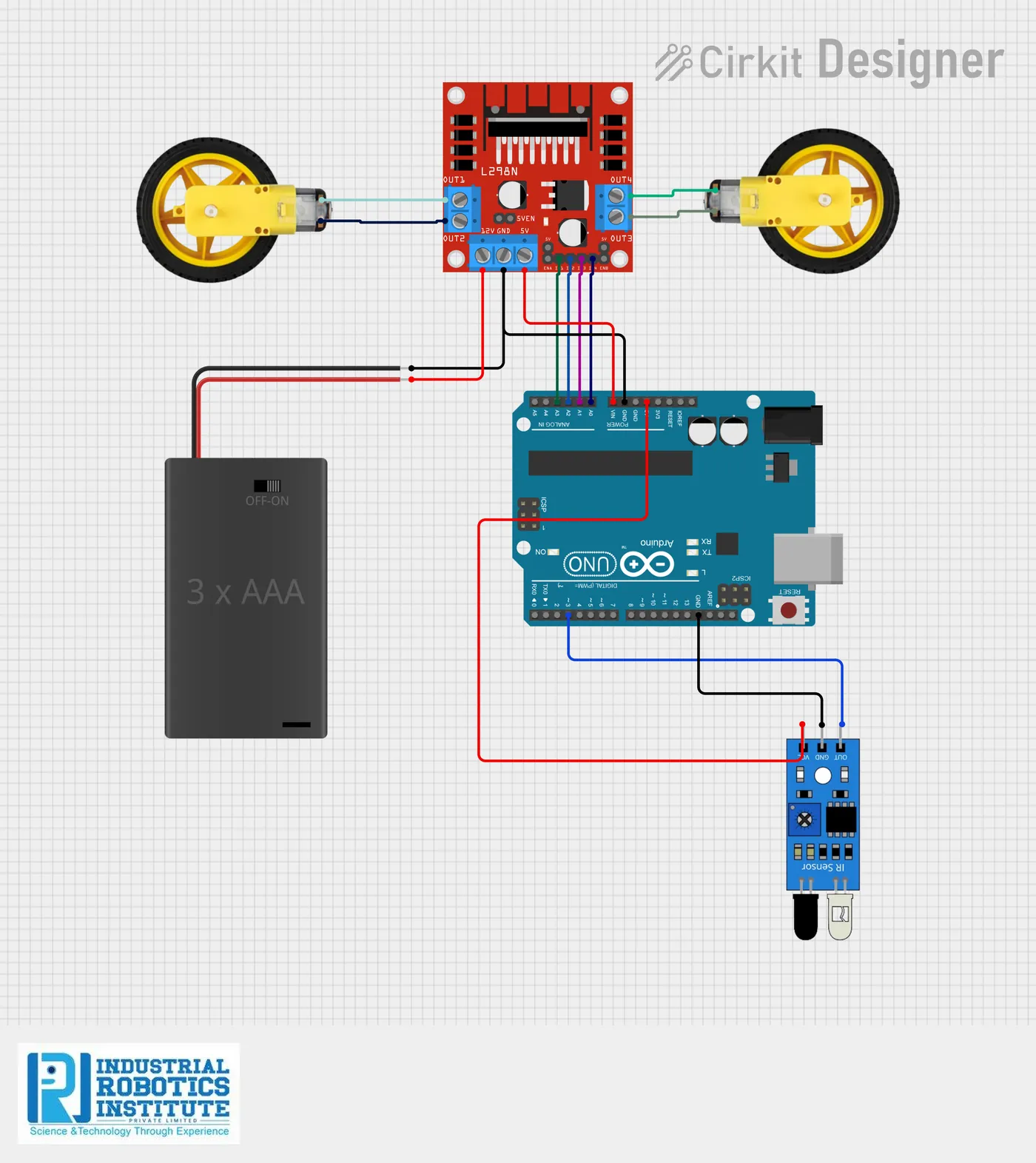
What is the Table Robot (Edge Avoiding)?
A small autonomous robot that drives around on a table top without falling off. A single IR sensor at the front bottom watches the surface; when it sees the edge, the robot backs up, turns and carries on in a new direction.
How it works
- An IR sensor at the front bottom faces down at the table.
- While it sees the table surface, the Arduino drives both motors forward.
- At the edge the sensor output changes, so the robot reverses for half a second.
- It then turns left briefly to face a new direction.
- The Arduino controls the motors through the L298N driver and repeats this forever.
Parts list
| Component | Qty |
|---|---|
| Arduino Uno | 1 |
| IR Sensor Module | 1 |
| L298N Motor Driver Module | 1 |
| BO Gear Motors | 2 |
| Robot Chassis | 1 |
| Wheels | 2 |
| 2-cell 18650 Battery Holder with Switch | 1 |
| Jumper Wires | As needed |
Software
- Arduino IDE
Wiring and connections
| From | Connect to |
|---|---|
| IR sensor VCC | 5V |
| IR sensor GND | GND |
| IR sensor OUT | Pin 3 |
| L298N IN1 (left motor) | A0 |
| L298N IN2 (left motor) | A1 |
| L298N IN3 (right motor) | A2 |
| L298N IN4 (right motor) | A3 |
| Battery + | L298N 12V |
| Battery − | L298N GND |
| Arduino GND | L298N GND |
How to build the Table Robot (Edge Avoiding)
- Assemble the chassis with both BO motors, wheels and the battery holder.
- Mount the IR sensor at the front, pointing down at the table about 1 cm above it.
- Wire the sensor to 5V, GND and pin 3.
- Connect L298N IN1–IN4 to A0–A3 and the motors to the L298N outputs.
- Connect the battery pack to the L298N 12V and GND, and join the Arduino GND to the L298N GND.
- Upload the code from the Arduino IDE.
- Adjust the IR sensor’s sensitivity screw so it changes state right at the edge.
- Place the robot on a table and switch on; stay close the first few runs.
Table Robot (Edge Avoiding) code
Complete, tested Arduino C++ code for this project. Copy it into Arduino IDE and upload it to the Arduino Uno.
int sensor = 3;

int IN1 = A0;
int IN2 = A1;
int IN3 = A2;
int IN4 = A3;

void setup() {
  pinMode(sensor, INPUT);
  pinMode(IN1, OUTPUT);
  pinMode(IN2, OUTPUT);
  pinMode(IN3, OUTPUT);
  pinMode(IN4, OUTPUT);
}

void forward() {
  digitalWrite(IN1, HIGH); digitalWrite(IN2, LOW);
  digitalWrite(IN3, HIGH); digitalWrite(IN4, LOW);
}

void backward() {
  digitalWrite(IN1, LOW); digitalWrite(IN2, HIGH);
  digitalWrite(IN3, LOW); digitalWrite(IN4, HIGH);
}

void left() {
  digitalWrite(IN1, LOW); digitalWrite(IN2, HIGH);
  digitalWrite(IN3, HIGH); digitalWrite(IN4, LOW);
}

void stopMotor() {
  digitalWrite(IN1, LOW); digitalWrite(IN2, LOW);
  digitalWrite(IN3, LOW); digitalWrite(IN4, LOW);
}

void loop() {
  int edge = digitalRead(sensor);   // 0 = table surface, 1 = edge

  if (edge == 0) {
    forward();
  } else {
    backward();
    delay(500);
    left();
    delay(400);
  }
}
Real-world uses
- Learning edge detection
- Table-top robot demos
- Intro to autonomous robots
- Science exhibitions
Frequently asked questions
What is a Table Robot (Edge Avoiding)?
A small autonomous robot that drives around on a table top without falling off. A single IR sensor at the front bottom watches the surface; when it sees the edge, the robot backs up, turns and carries on in a new direction.
What components are needed for the Table Robot (Edge Avoiding)?
You need: Arduino Uno (1), IR Sensor Module (1), L298N Motor Driver Module (1), BO Gear Motors (2), Robot Chassis (1), Wheels (2), 2-cell 18650 Battery Holder with Switch (1), Jumper Wires. Software: Arduino IDE.
Is the Table Robot (Edge Avoiding) project good for beginners?
Yes. It is rated beginner and takes about 1–2 hours to build, using the Arduino Uno. The guide on this page explains every connection and step.
Where can I get the code for the Table Robot (Edge Avoiding)?
The complete, tested Arduino C++ code is free on this page. Copy it into Arduino IDE and upload it to the board.
Can I buy a kit for the Table Robot (Edge Avoiding)?
Yes. IRI sells a kit with the parts for this project (PRJ-008). Message IRI on WhatsApp at +91 86060 82634 for the kit price and delivery details.