
Bluetooth Controlled Car Using Arduino
Drive a robot car from your Android phone over Bluetooth.
Built and tested by Anju.A · Industrial Robotics Institute
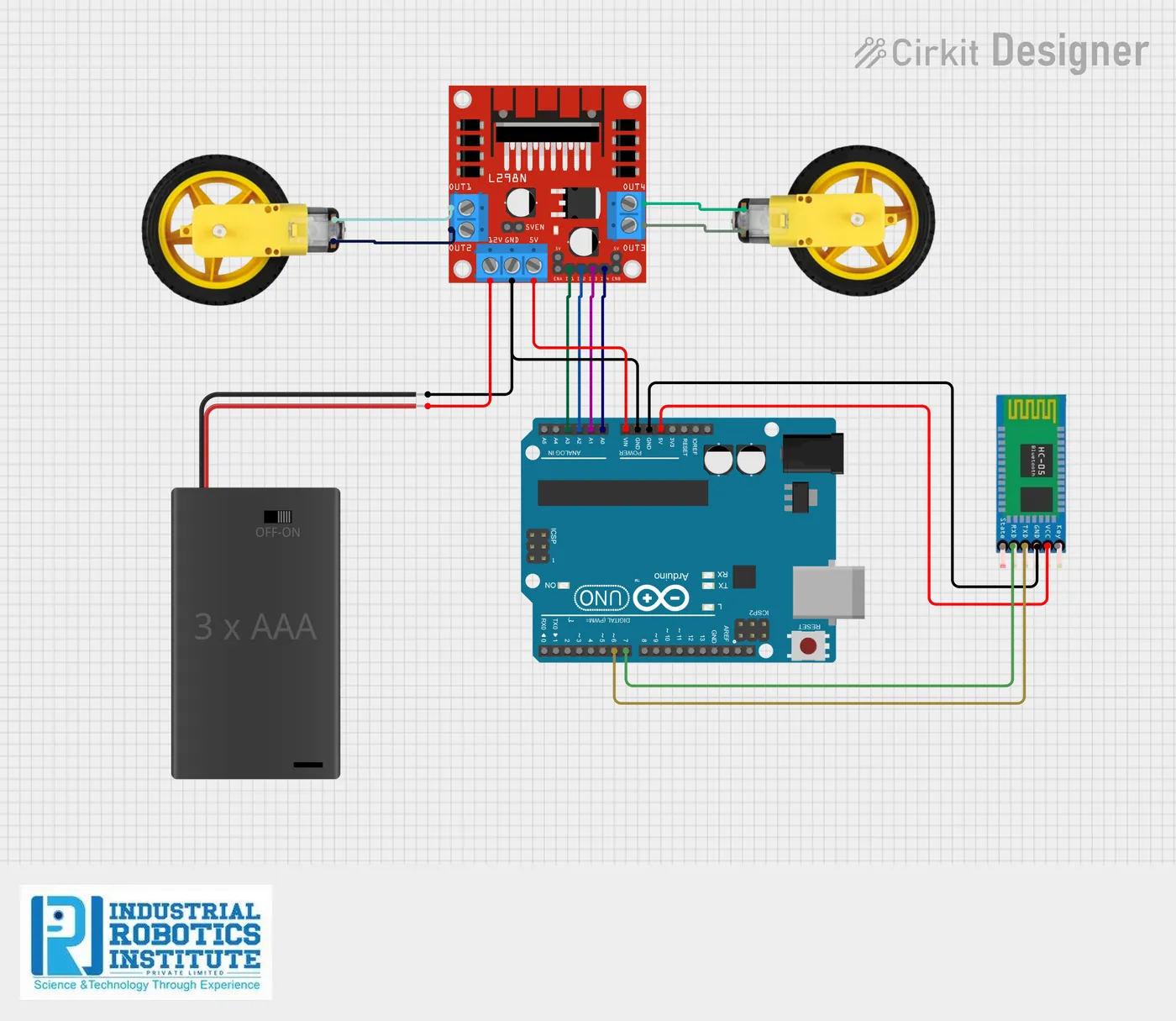
What is the Bluetooth Controlled Car?
A robot car you drive wirelessly from a smartphone. An HC-05 Bluetooth module receives single-letter commands from a phone app and passes them to the Arduino, which drives the two motors through an L298N motor driver to go forward, back, left, right or stop.
How it works
- A Bluetooth controller app on the phone sends a letter for each button.
- The HC-05 module receives it and passes it to the Arduino over serial.
- The Arduino reads the letter: F forward, B backward, L left, R right, S stop.
- It sets the L298N inputs so both motors turn the right way.
Parts list
| Component | Qty |
|---|---|
| Arduino Uno | 1 |
| L298N Motor Driver Module | 1 |
| HC-05 Bluetooth Module | 1 |
| DC Motors | 2 |
| Robot Car Chassis | 1 |
| Wheels | 2 |
| 2-cell 18650 Battery Holder with Switch | 1 |
| Jumper Wires | As needed |
Software
- Arduino IDE
- Bluetooth RC Controller app (Android)
- SoftwareSerial library
Wiring and connections
| From | Connect to |
|---|---|
| HC-05 VCC | 5V |
| HC-05 GND | GND |
| HC-05 TX | Pin 6 |
| HC-05 RX | Pin 7 |
| L298N IN1 | A0 |
| L298N IN2 | A1 |
| L298N IN3 | A2 |
| L298N IN4 | A3 |
| Motor A | L298N OUT1 & OUT2 |
| Motor B | L298N OUT3 & OUT4 |
How to build the Bluetooth Controlled Car
- Build the car chassis with both motors, wheels and the battery holder.
- Connect the motors to the L298N outputs and L298N IN1–IN4 to A0–A3.
- Wire the HC-05: VCC to 5V, GND to GND, TX to pin 6, RX to pin 7.
- Upload the code from the Arduino IDE.
- Install a Bluetooth RC controller app on your Android phone.
- Pair the phone with the HC-05 (default PIN 1234 or 0000).
- Connect in the app and set the buttons to send F, B, L, R and S.
- Drive the car.
Bluetooth Controlled Car code
Complete, tested Arduino C++ code for this project. Copy it into Arduino IDE and upload it to the Arduino Uno.
#include <SoftwareSerial.h>

SoftwareSerial bluetooth(6, 7); // RX, TX

char command;

// Motor driver pins
int IN1 = A0;
int IN2 = A1;
int IN3 = A2;
int IN4 = A3;

void setup() {
  bluetooth.begin(9600);
  pinMode(IN1, OUTPUT);
  pinMode(IN2, OUTPUT);
  pinMode(IN3, OUTPUT);
  pinMode(IN4, OUTPUT);
}

void loop() {
  if (bluetooth.available()) {
    command = bluetooth.read();
  }

  if (command == 'F') {          // Forward
    digitalWrite(IN1, HIGH); digitalWrite(IN2, LOW);
    digitalWrite(IN3, HIGH); digitalWrite(IN4, LOW);
  }
  else if (command == 'B') {     // Backward
    digitalWrite(IN1, LOW);  digitalWrite(IN2, HIGH);
    digitalWrite(IN3, LOW);  digitalWrite(IN4, HIGH);
  }
  else if (command == 'L') {     // Left
    digitalWrite(IN1, LOW);  digitalWrite(IN2, HIGH);
    digitalWrite(IN3, HIGH); digitalWrite(IN4, LOW);
  }
  else if (command == 'R') {     // Right
    digitalWrite(IN1, HIGH); digitalWrite(IN2, LOW);
    digitalWrite(IN3, LOW);  digitalWrite(IN4, HIGH);
  }
  else if (command == 'S') {     // Stop
    digitalWrite(IN1, LOW);  digitalWrite(IN2, LOW);
    digitalWrite(IN3, LOW);  digitalWrite(IN4, LOW);
  }
}
Real-world uses
- Remote-controlled toys
- Learning wireless control
- Robotics competitions
- Phone-controlled vehicles
Frequently asked questions
What is a Bluetooth Controlled Car?
A robot car you drive wirelessly from a smartphone. An HC-05 Bluetooth module receives single-letter commands from a phone app and passes them to the Arduino, which drives the two motors through an L298N motor driver to go forward, back, left, right or stop.
What components are needed for the Bluetooth Controlled Car?
You need: Arduino Uno (1), L298N Motor Driver Module (1), HC-05 Bluetooth Module (1), DC Motors (2), Robot Car Chassis (1), Wheels (2), 2-cell 18650 Battery Holder with Switch (1), Jumper Wires. Software: Arduino IDE, Bluetooth RC Controller app (Android), SoftwareSerial library.
Is the Bluetooth Controlled Car project good for beginners?
Yes. It is rated beginner and takes about 2–3 hours to build, using the Arduino Uno. The guide on this page explains every connection and step.
Where can I get the code for the Bluetooth Controlled Car?
The complete, tested Arduino C++ code is free on this page. Copy it into Arduino IDE and upload it to the board.
Can I buy a kit for the Bluetooth Controlled Car?
Yes. IRI sells a kit with the parts for this project (PRJ-011). Message IRI on WhatsApp at +91 86060 82634 for the kit price and delivery details.