
IoT Hydration Reminder Band Using ESP32
A wearable that buzzes when it is time to drink water and logs every drink.
Built and tested by Anju.A · Industrial Robotics Institute
What is the IoT Hydration Reminder Band?
A wrist-worn hydration reminder. The ESP32 counts down a reminder interval (30 minutes by default) and shows the status on a small OLED. Press the button each time you drink; if you don’t, the buzzer sounds and the Blynk app sends a "Time to drink water!" notification. Your daily drink count is sent to the app.
How it works
- The ESP32 starts a 30-minute timer.
- Pressing the button logs a drink: the count goes up, the OLED shows "Water Taken!" and the timer resets.
- If the timer runs out, the buzzer sounds for 2 seconds and the OLED shows "Drink Water!".
- A Blynk event sends a phone notification, and the drink count is sent to V0.
Parts list
| Component | Qty |
|---|---|
| ESP32 Dev Board | 1 |
| OLED Display (SSD1306, I2C) | 1 |
| Push Button | 1 |
| Buzzer | 1 |
| Li-ion Battery + Charging Module | 1 |
| Jumper Wires | As needed |
Software
- Arduino IDE
- Blynk IoT app
- Adafruit GFX library
- Adafruit SSD1306 library
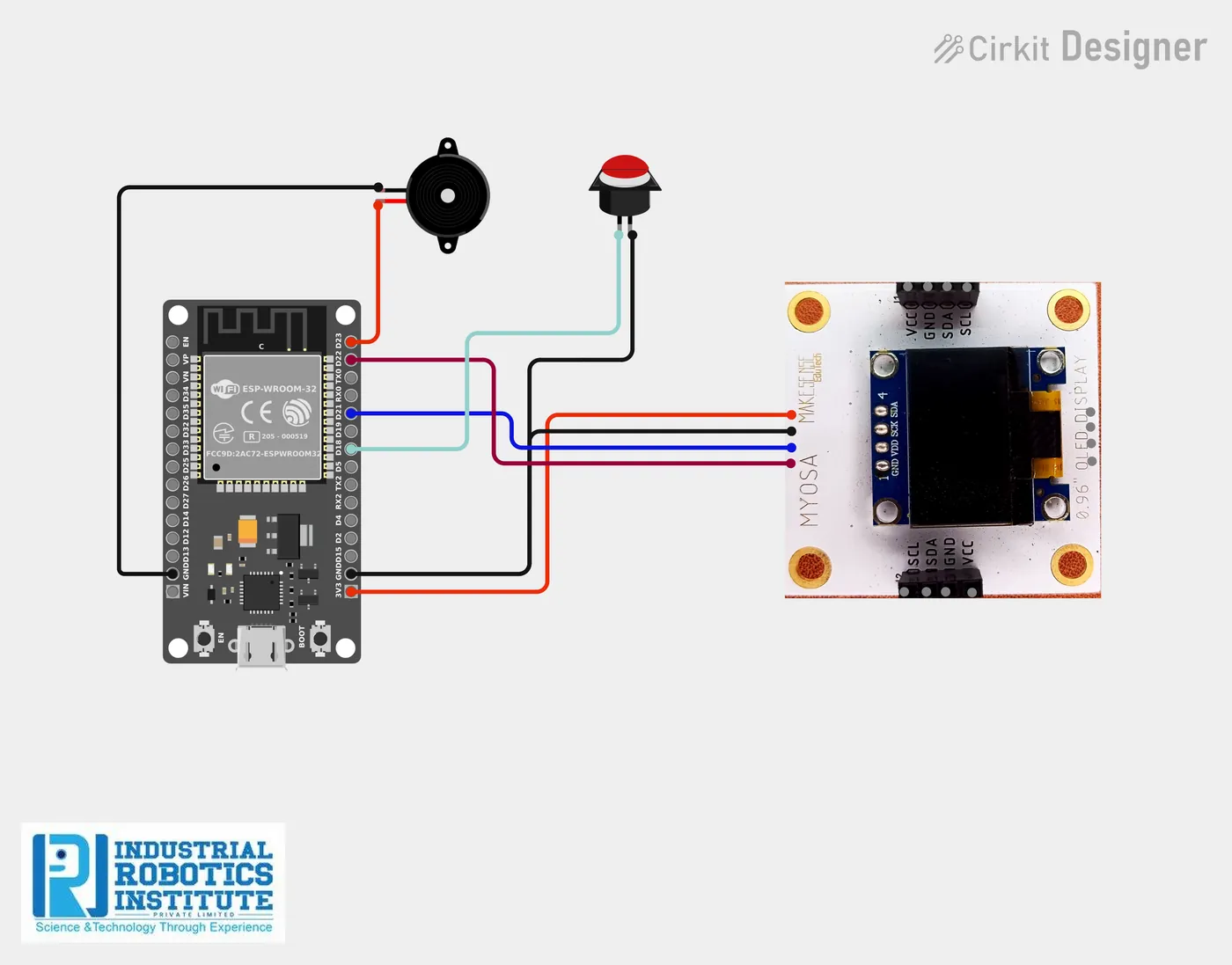
Wiring and connections
| From | Connect to |
|---|---|
| OLED VCC | 3.3V |
| OLED GND | GND |
| OLED SDA | GPIO 21 |
| OLED SCL | GPIO 22 |
| Button | GPIO 18 and GND |
| Buzzer + | GPIO 23 |
| Buzzer − | GND |
How to build the IoT Hydration Reminder Band
- Connect the OLED to GPIO 21/22, the button between GPIO 18 and GND, and the buzzer to GPIO 23.
- In Blynk, create a template with datastream V0 (integer) and an Event called drink_water with notifications on.
- Create a device and copy its Auth Token.
- Install the Adafruit GFX and SSD1306 libraries.
- Add your Blynk details and Wi-Fi to the code and upload it.
- Fit the electronics and battery in a wrist strap case.
IoT Hydration Reminder Band code
Complete, tested Arduino C++ code for this project. Copy it into Arduino IDE and upload it to the ESP32.
#define BLYNK_TEMPLATE_ID "YourTemplateID"
#define BLYNK_TEMPLATE_NAME "Hydration Band"
#define BLYNK_AUTH_TOKEN "YourAuthToken"
#define BLYNK_PRINT Serial

#include <WiFi.h>
#include <BlynkSimpleEsp32.h>
#include <Wire.h>
#include <Adafruit_GFX.h>
#include <Adafruit_SSD1306.h>

char ssid[] = "YOUR_WIFI";
char pass[] = "YOUR_PASS";

#define BUZZER 23
#define BUTTON 18

Adafruit_SSD1306 display(128, 64, &Wire, -1);

unsigned long previousMillis = 0;
long interval = 1800000;   // 30 minutes
int waterCount = 0;

void showText(const char* txt) {
  display.clearDisplay();
  display.setTextSize(2);
  display.setTextColor(WHITE);
  display.setCursor(0, 20);
  display.print(txt);
  display.display();
}

void setup() {
  Serial.begin(115200);
  pinMode(BUZZER, OUTPUT);
  pinMode(BUTTON, INPUT_PULLUP);

  Blynk.begin(BLYNK_AUTH_TOKEN, ssid, pass);

  display.begin(SSD1306_SWITCHCAPVCC, 0x3C);
  showText("Ready");
}

void loop() {
  Blynk.run();
  unsigned long currentMillis = millis();

  // Button pressed: drink logged
  if (digitalRead(BUTTON) == LOW) {
    waterCount++;
    previousMillis = currentMillis;
    Blynk.virtualWrite(V0, waterCount);
    showText("Water Taken!");
    delay(1000);
  }

  // Reminder
  if (currentMillis - previousMillis >= interval) {
    digitalWrite(BUZZER, HIGH);
    delay(2000);
    digitalWrite(BUZZER, LOW);

    Blynk.logEvent("drink_water", "Time to drink water!");
    showText("Drink Water!");
    previousMillis = currentMillis;
  }
}
Real-world uses
- Students and office workers
- Elderly care
- Athletes and gym users
- Learning wearable IoT
Frequently asked questions
What is a IoT Hydration Reminder Band?
A wrist-worn hydration reminder. The ESP32 counts down a reminder interval (30 minutes by default) and shows the status on a small OLED.
What components are needed for the IoT Hydration Reminder Band?
You need: ESP32 Dev Board (1), OLED Display (SSD1306, I2C) (1), Push Button (1), Buzzer (1), Li-ion Battery + Charging Module (1), Jumper Wires. Software: Arduino IDE, Blynk IoT app, Adafruit GFX library, Adafruit SSD1306 library.
Is the IoT Hydration Reminder Band project good for beginners?
It is rated intermediate and takes about 2–3 hours to build, using the ESP32. The guide on this page explains every connection and step.
Where can I get the code for the IoT Hydration Reminder Band?
The complete, tested Arduino C++ code is free on this page. Copy it into Arduino IDE and upload it to the board.
Can I buy a kit for the IoT Hydration Reminder Band?
Yes. IRI sells a kit with the parts for this project (PRJ-144). Message IRI on WhatsApp at +91 86060 82634 for the kit price and delivery details.